


Best AI Studio for Product Photography in India (2026 Guide)
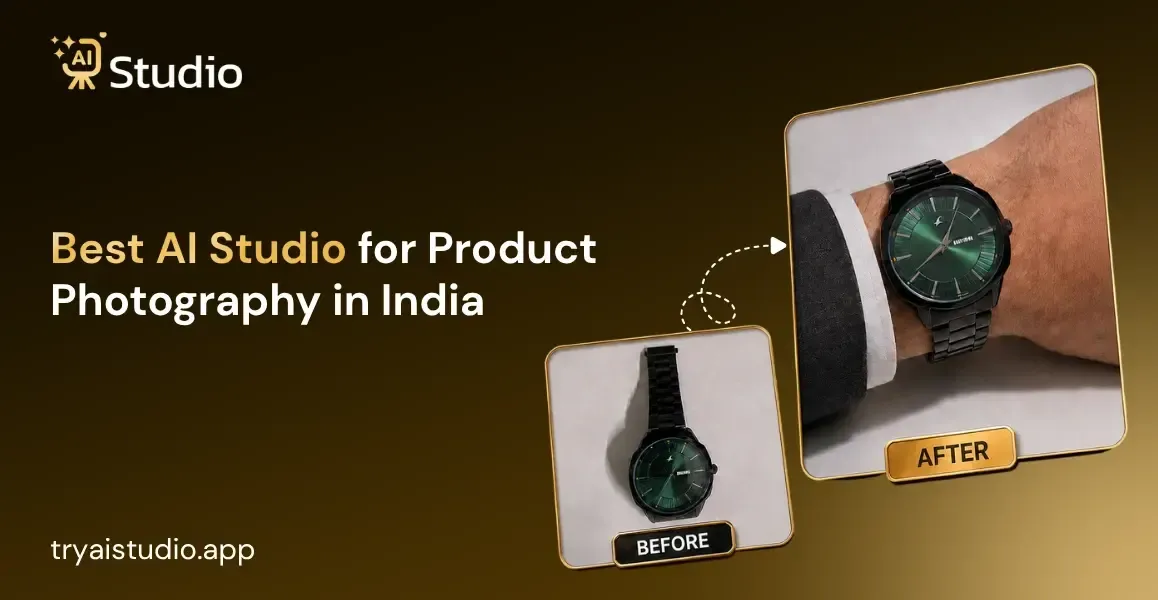
If you have an online business in India, you are already aware of this problem. Getting a decent photo shoot for your products can easily cost you anywhere between ₹10,000 to ₹50,000.
Even before adding the opportunity cost of looking for a good photo studio, hiring a model for the shoot, and waiting for the photos to get edited.
I have come across many businesses that struggle to get the best pictures of their products due to these obstacles, and it doesn't matter how great their product is, if people aren't drawn to the image, it rarely becomes popular.
That is exactly why the best AI studio for product photography has become such a big topic among Amazon, Flipkart, and Shopify sellers in 2026. In my experience, photoshoots can get really expensive for small brands, and most sellers simply cannot afford to reshoot every time they launch a new product or run a festive sale.
This guide will walk you through what AI product photography actually is, what to look for before you pick a tool, and how sellers across India are using it to solve a problem that used to eat up their entire budget.
What Is AI Product Photography and How Does It Work?
Let me first explain the concept behind AI product photography in very simple language. The idea is simple: take a raw image of your product that you probably took with your smartphone and turn it into a high-quality image. There is no need for expensive photography equipment or for a professional photographer to take a picture of your product.
Let me now give you a more detailed explanation. Essentially, you can upload one photo of your product and an AI image editor will make it look like it was shot in a professional photography studio. It will recognize its shape, the material of your product, and the contours of your product and then recreate the background. The shadows will also be adjusted to match the lighting of the new background. Here's how an AI photo generator works behind the scenes, if you want to go deeper into the technical part.
How AI Product Photo Generators Create Realistic Scenes
Think about it this way. A product image ai tool does not just paste your product onto a random picture. It actually studies your product first.
- It detects the exact outline of your product, even tricky edges like jewelry chains or fabric folds
- It reads the surface, so a glossy bottle reflects light differently than a matte fabric bag
- It generates a background scene, whether that's a plain white backdrop or a lifestyle setting like a marble table
- It adds shadows and lighting so the product does not look like it was simply cut and pasted
This is why a free ai photo editor online can produce images that seem magical at first. Not all tools are created equal, which is why it is important to choose one carefully.
Many editors ask me how to ai image generator works, but it is not necessary to know technical details to use its capabilities. The most important thing is to look at the results: realistic shadows, lighting that matches the background, and colors that are true to life.
If these signs are present, then the ai image generator for product photos works well enough to create images for an actual sale. On the contrary, if the contours of the images are too smooth, or the lighting looks artificial, this means the ai product image generator does not have high enough quality to create satisfying images.
This is precisely the difference between such an editor and a regular photo editor. Using a photo editor, you can only touch up the photo you have. The ai image generator for products creates images from nothing, including all the necessary effects such as reflections, shadows on the floor, and perspective. These elements were not in the original photo, but the ai image generator added them to make the product look natural in the environment.
Why Indian Ecommerce Sellers Are Switching to AI Studios
Let me give you an example of the numbers first. A decent photo shoot for a product in a Tier-1 Indian city costs anywhere between INR 15000 to 30000 per day. So, for a D2C fashion brand launching 50 products in a new collection you have to shell out a lot of money just for the photoshoots, not to mention the model hire for product photoshoot with model style images.
Many sellers I've spoken to would plan their content strategy around one photo shoot every few months, leaving them little to no scope for festive sales, quick product launches or experimenting with different backgrounds.
With product photography AI, that entire process shrinks down to minutes. Here's what changed for most sellers I've spoken to:
- No more waiting weeks to book a studio and photographer
- No pressure to shoot fifty products in one rushed session
- Freedom to create festive season versions of the same product without rebooking anything
- Consistent looking images across the entire catalog, which matters more than people realize
Think about a potential buyer scrolling through your Etsy shop looking for a particular type of item. They might not be able to explain it, but they can sense when one of your listing photos stands out from the rest in terms of lighting or style, even if they can't put their finger on why. This is a big part of why Indian brands are switching to AI photography, because with ecommerce photography ai tools, you'll always have perfectly consistent photos in every listing, every batch.
Small business owners on a budget will feel the difference the most. A marketing agency that previously had to do product photography shoots for multiple clients now has to plan ahead for every single shoot, hiring models, booking studios, and paying editors.
But with ai product photography for ecommerce, the same agency can handle five different clients' shoots in the same afternoon, since there's no need for any of the above.
Another advantage that few people seem to consider is the ability to test new ideas without the high overhead of traditional photography.
You could try three different variations of the same background photo and see which one gets the best engagement, whereas before it would be cost prohibitive to even consider doing something like that.
Big companies with big marketing budgets used to be the only ones who could afford to experiment like that, but now any small business owner with a Shopify store can do the same.
What to Look for in the Best AI Studio for Product Photography
Not every tool that calls itself an AI product photography tool actually delivers good results. Before you pick one, here is what actually matters, and this is worth reading fully before you try a product image generator for the first time.
Background and Lighting Realism
This one is obvious, but many buyers overlook it, to their dismay. If you use a product image generator that adds a background but fails to consider the lighting angle, your product will look unnatural, like a poorly edited Photoshop. Test any tool with your own product before investing.
Marketplace Compliance (Amazon and Flipkart Image Specs)
This part is often neglected by sellers, but it has a significant impact on your sales. Amazon requires a pure white color, a minimum image size, and product image filling the frame. Flipkart has similar requirements.
Therefore, the best AI tool for removing background in product photos should provide you with compliant images with white backgrounds without having to check each picture's pixel dimensions.
I have seen many sellers getting their images rejected due to minor background color deviations or product size being too small in the frame. The AI tool for e-commerce product photos with background removal eliminates the need to worry about such details as it is engineered to follow compliance requirements.
Check if the best AI image generator for white backgrounds has a dedicated mode for Amazon or other platforms you are going to use. This way, you will save time on adjustments and avoid listing rejections due to minor specification differences.
On-Model and Fashion Photography Support
If you have a fashion, jewelry, or accessories brand, this is probably your primary concern. Traditional on model AI fashion photo without model style shoots require hiring a model, a stylist, and a studio. However, an AI fashion photography generator can place your clothes or jewelry on a realistic model without the need for a model, a stylist, or a studio.
Free Tiers and INR Pricing
Some small business owners may not be able to afford a pricey monthly subscription to an image generator. You can see which platforms offer you an AI product photo generator free trial option and if the currency on their pricing page is in INR (Indian Rupees) and not in USD (United States Dollars) which would make the prices seem higher than they should be.
It is extremely important to have accurate and realistic AI product photography when it comes to jewelry items, because of the intricate details and metal surfaces that can easily be misjudged.
The best AI jewelry product photography tools can capture the intricate detailing of the gemstone without losing its brilliance and highlighting the delicate pattern of the chains used to make the jewelry. You should test this out by uploading a real picture of jewelry to see how the AI will edit it, since high-quality AI product photos for jewelry is one of the hardest categories for AI tools to get right, before you pay for any subscription.
Best AI Studio for Product Photography in 2026: Top Picks by Use Case
Let me show you how to think about this by use case, because the "best" tool really depends on what you're actually selling and where.
Best for Amazon Sellers
If your primary concern is how to enhance your Amazon listing image, you need a tool that delivers you a compliant white background plus a couple of lifestyle options for your A+ content. Maintaining the uniform appearance of your catalog is more important than experimenting with creative backgrounds.
Best for Shopify Stores
A Shopify product image AI tool should allow the user to edit both product images and lifestyle photos since Shopify-based businesses value storytelling more through imagery as compared to marketplaces, making a virtual product photoshoot for Shopify an optimal choice.
Best for Fashion and On-Model Shots
For clothing and accessories brands, the studio quality AI product photos no photographer has become extremely close to real photos. Using AI Studio, you can create on-model photos of your clothing collection without any models and invest hours into building your catalog with thousands of unique images for your D2C fashion labels, and the studio quality AI product photos no photographer needed approach is exactly why many direct-to-consumer fashion founders I know have begun to leverage this to update their collections every week rather than every season.
Best Free AI Product Photography Tools
If you're just starting out and testing the waters, look for product photography app free options with a reasonable free credit limit. Many tools offer around 40 to 100 free generations a month, which is enough to test quality before you commit to a paid plan.
Here's an honest comparison of what to expect across pricing tiers:
- Free plans: Usually 20 to 100 free image generations per month, good for testing
- Budget plans: Around ₹500 to ₹1,000 per month for small catalogs
- AI Studio specifically starts around ₹600 per month, generates images in about 10 seconds, and works well for fashion, jewelry, accessories, ecommerce listings, and even social media ads
- Enterprise plans: Custom pricing for brands managing thousands of SKUs
I've seen brands use AI Studio to create consistent product images without hiring models, and the affordability is honestly what makes it practical for small sellers rather than just big brands with marketing budgets.
How to Create Studio-Quality Product Photos with AI (Step by Step)
Here's the reality: this isn't a theory, this is the exact process I follow inside AI Studio myself. It takes less than 10 minutes, and you don't need any prior experience with AI tools.
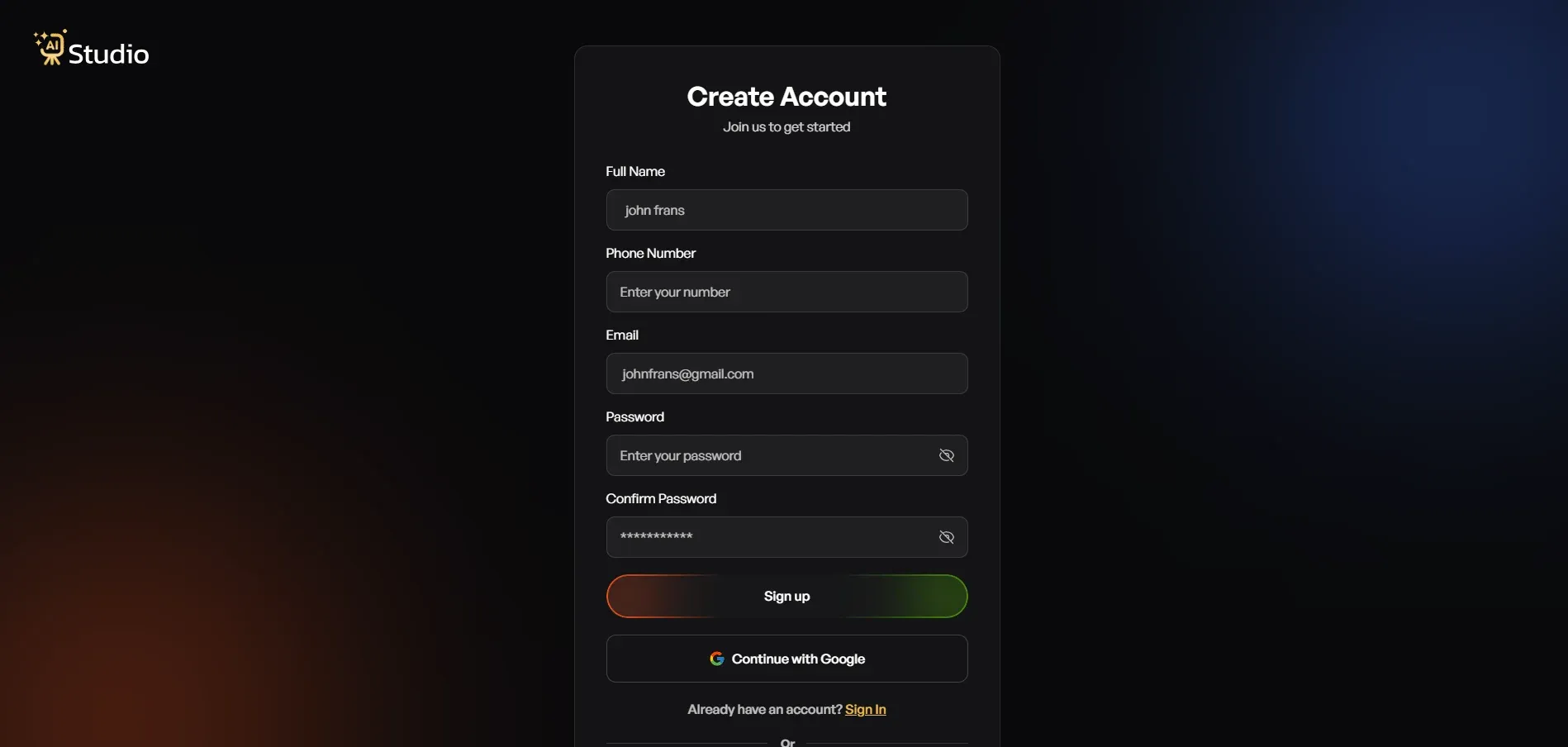
- Step 1: Create a free account and log in. Sign up on tryaistudio.app, no card details needed to get started. Once you log in, your dashboard opens up and you're ready to go.
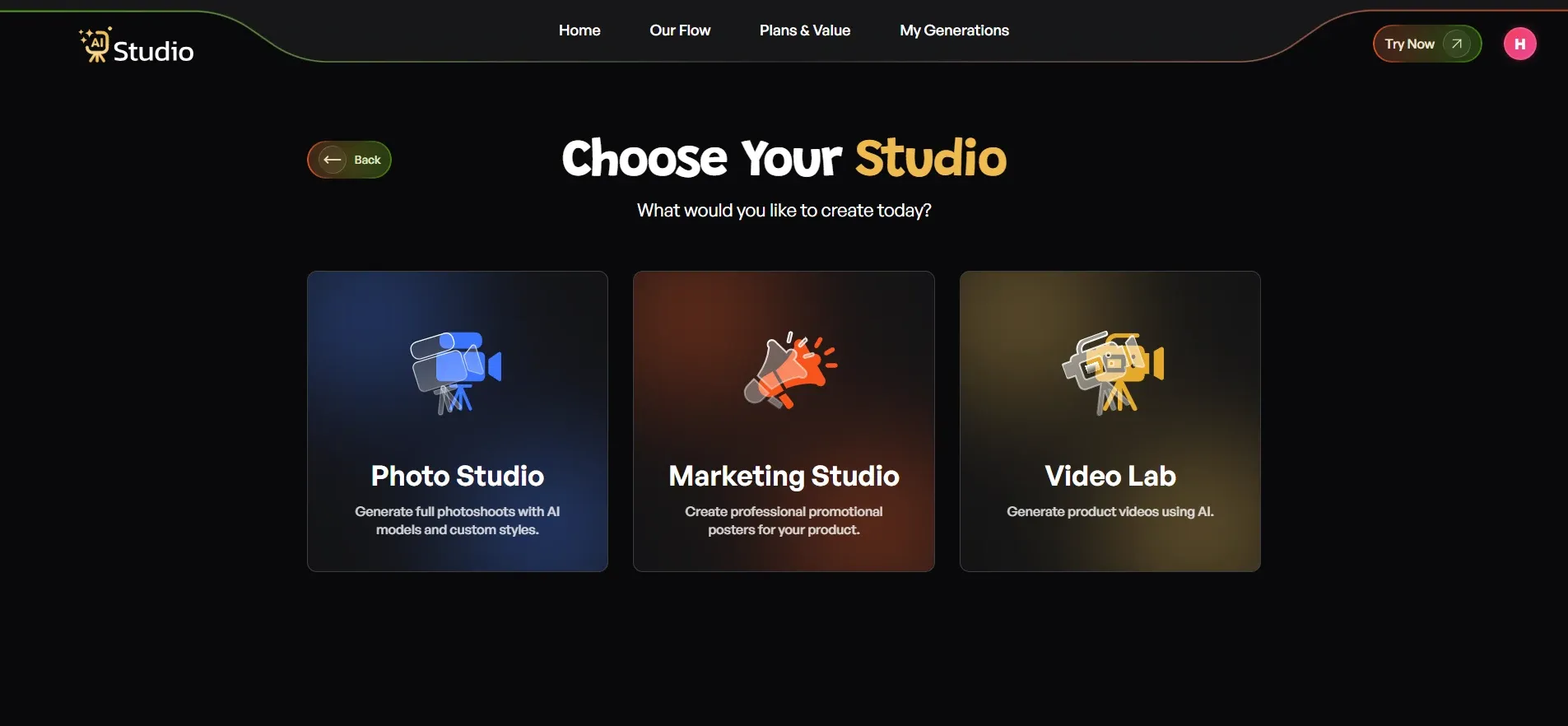
- Step 2: Choose your studio. Inside the dashboard, you'll see three options, Photo Studio, Marketing Studio, and Video Lab. For product image work, pick Photo Studio, since that's where all the image generation happens.
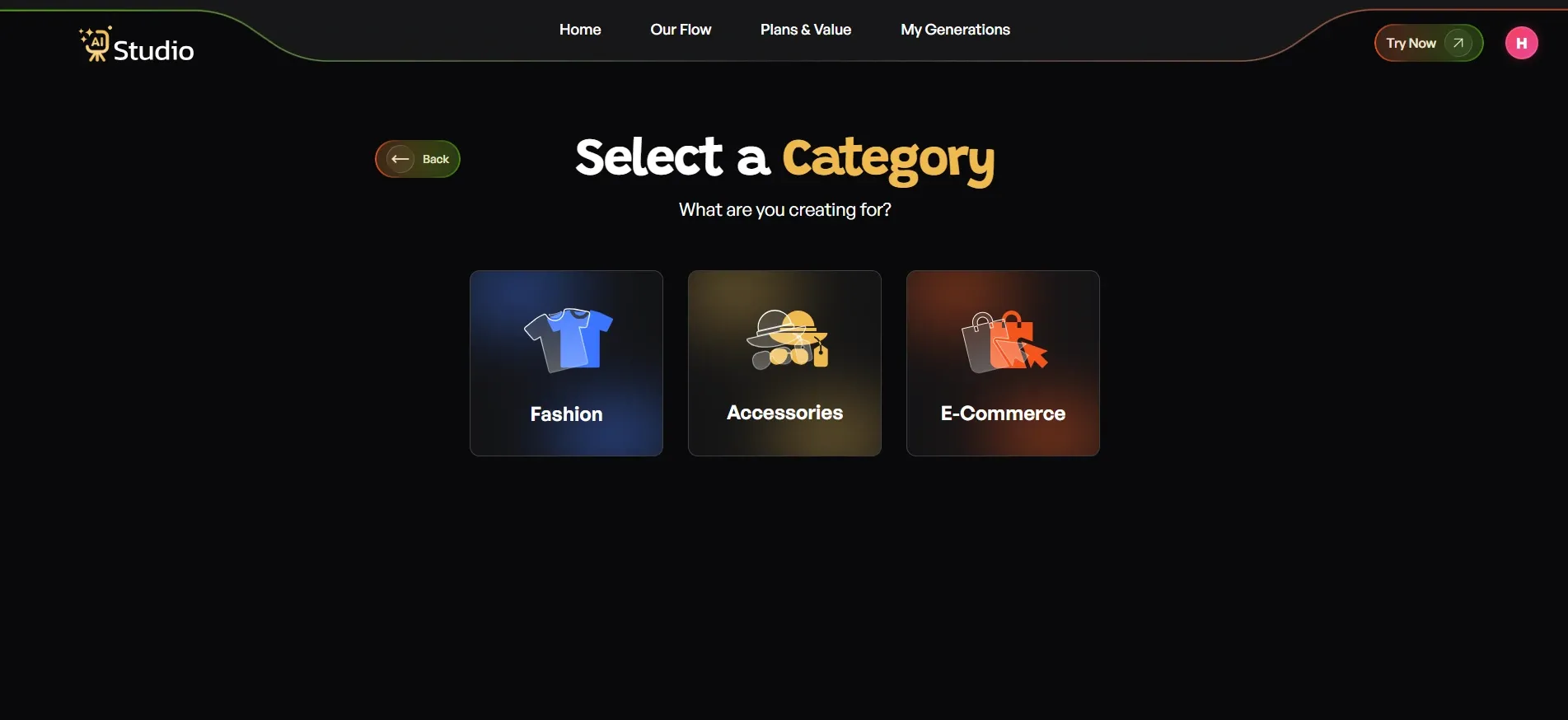
- Step 3: Select your category. Pick the option that matches your product:
- Choose Fashion if you're selling clothing like kurtas, t-shirts, dresses, or ethnic wear
- Choose Accessories if you sell watches, jewelry, bags, belts, or sunglasses
- Choose E-commerce for general listings like electronics, home goods, or beauty products
- If you pick Fashion or Accessories, you'll also choose Women, Men, or Kids, so the AI knows which model type to show
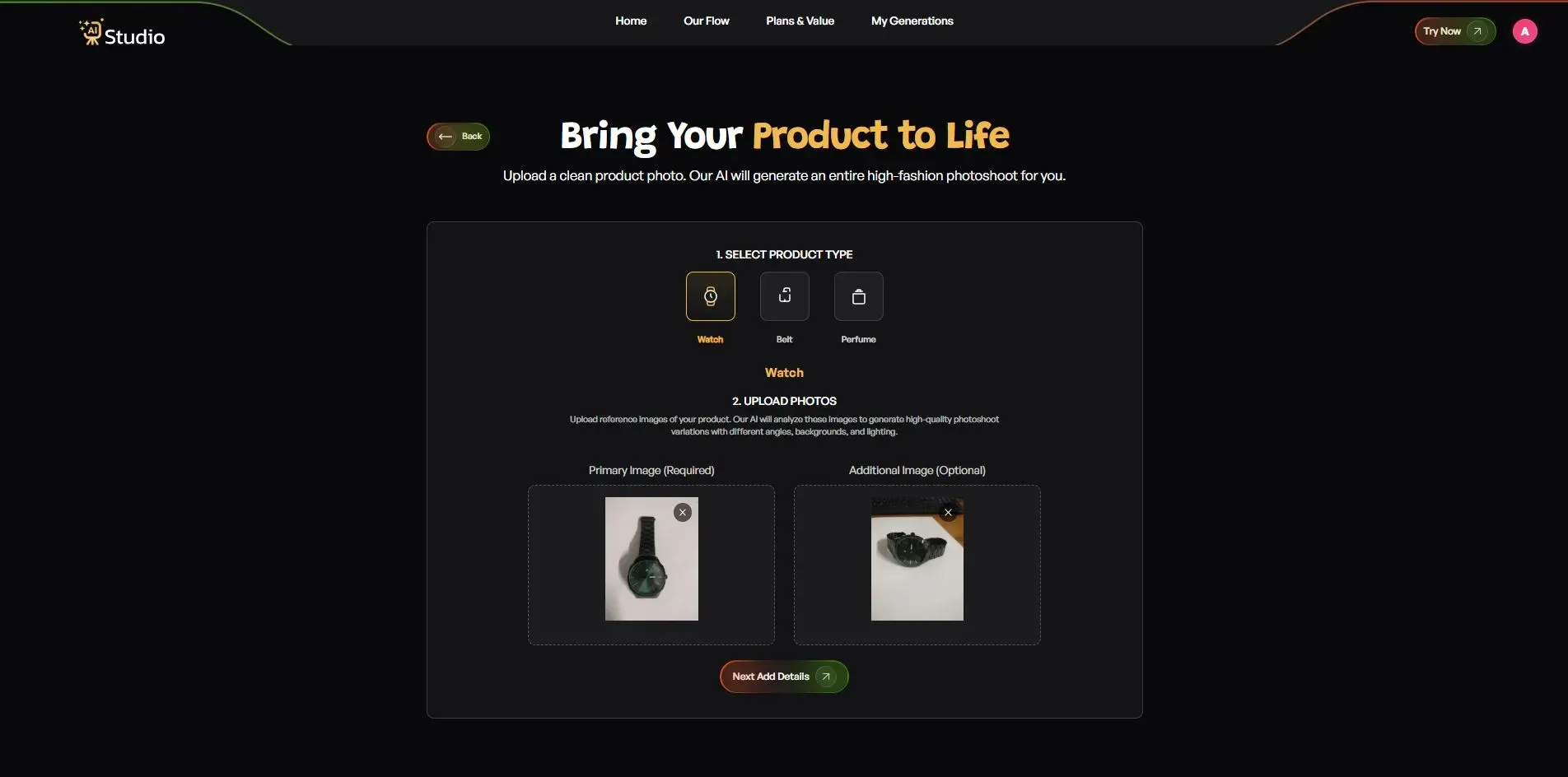
- Step 4: Upload your product photo. This step decides most of your final quality.
- Pick your exact product type, for accessories this could be Watch, Belt, Perfume, and so on
- Upload a Primary Image, a clear, front-facing photo of your product, this is required
- Add a second image if you have another angle, optional but helpful for accessories
- Your source photo should have a plain white or light coloured background for the best result. Any phone photo works fine as long as it's in focus and has decent light.
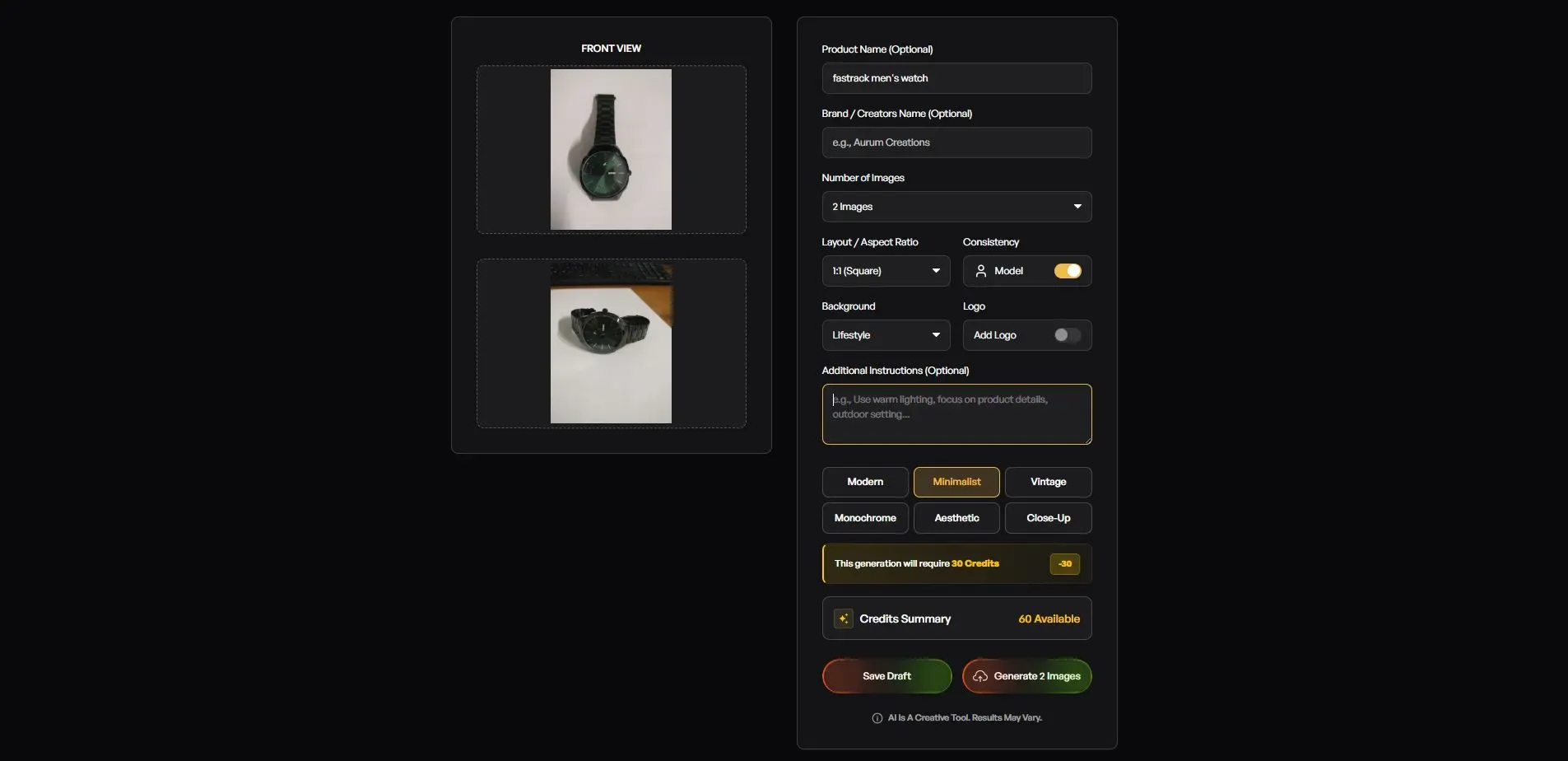
- Step 5: Fill in the final details. This is where you set the final look to match your platform and brand.
- Add your Product Name and Brand Name, optional but helps keep things consistent
- Set the Number of Images you want, 2, 4, or more
- Choose the Layout: 1:1 square for Amazon listings and Instagram, 4:5 for Instagram feed, 16:9 for banners
- Turn on Model Consistency if you want the same model across your whole catalog
- Choose a Background: Solid White works best for Amazon's main image spot, while lifestyle backgrounds suit a Shopify store and Instagram
- Pick a Style: Modern, Minimalist, Vintage, Monochrome, Aesthetic, or Close Up
- Add a Logo if you want your brand mark on the image
- Write any extra instructions, for example warm lighting, outdoor setting, or focus on product details.
- Step 6: Download your image. Click Generate, and within 10 seconds your image is ready in full quality, no editing needed, no back and forth. It's ready to go straight onto your Amazon listing, Shopify store, Flipkart page, or Instagram post.
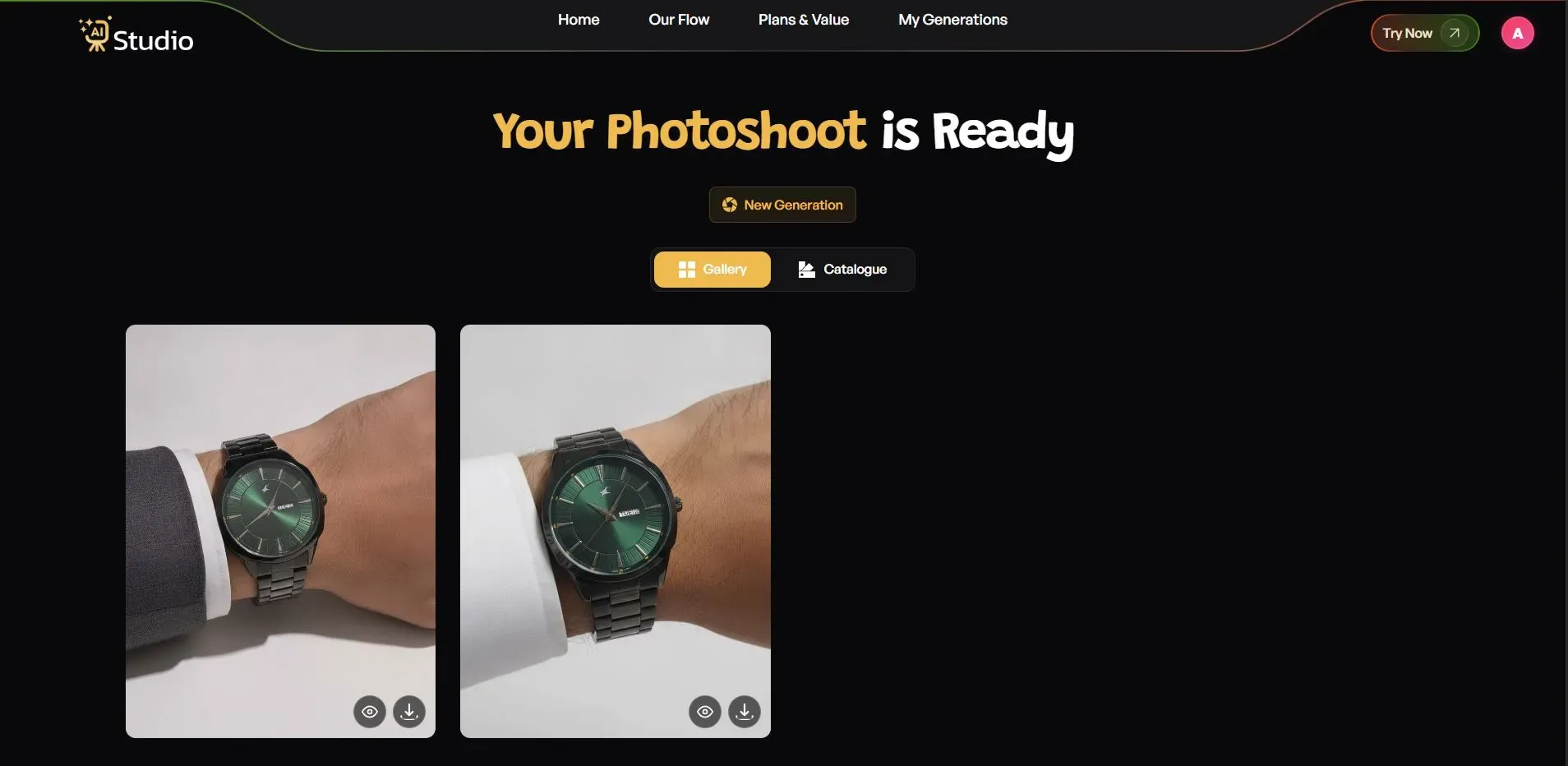
Instead of spending ₹20,000 on a shoot, many sellers now use AI Studio to go from a phone photo to a publish-ready listing image in under a minute.
AI vs Traditional Product Photography: Which Should You Choose?
Let's say it out loud: AI vs traditional product photography is not a choice between mutually exclusive options for all companies.
The classic approach with photographers in a studio makes perfect sense for flagship product photography, brand-specific campaigns, or shoots that require a high degree of artistic direction and specific props.
Meanwhile, automated product photography solutions are often much faster and more cost-effective for day-to-day catalog maintenance, seasonal photography needs, and standard product listings. Most of my clients who actually do most of their photography in-house still use traditional photo sessions for their core products or brand-specific projects.
Conclusion
Product photography doesn't have to burn a hole in your pocket anymore. The best AI studio for product photography lets Indian sellers create studio-quality product images in seconds, without hiring a photographer, renting a studio, or paying a model.
Whether you're selling on Amazon, Flipkart, or Shopify, or if you're a D2C fashion brand with a shoestring budget looking to refresh your catalog every week, tools like AI Studio can help.
If big-ticket shoots were holding you back from launching new listings, I'd recommend giving this a try before your next product launch.