


How to Use AI Product Photography for Ecommerce Store (Step-by-Step)
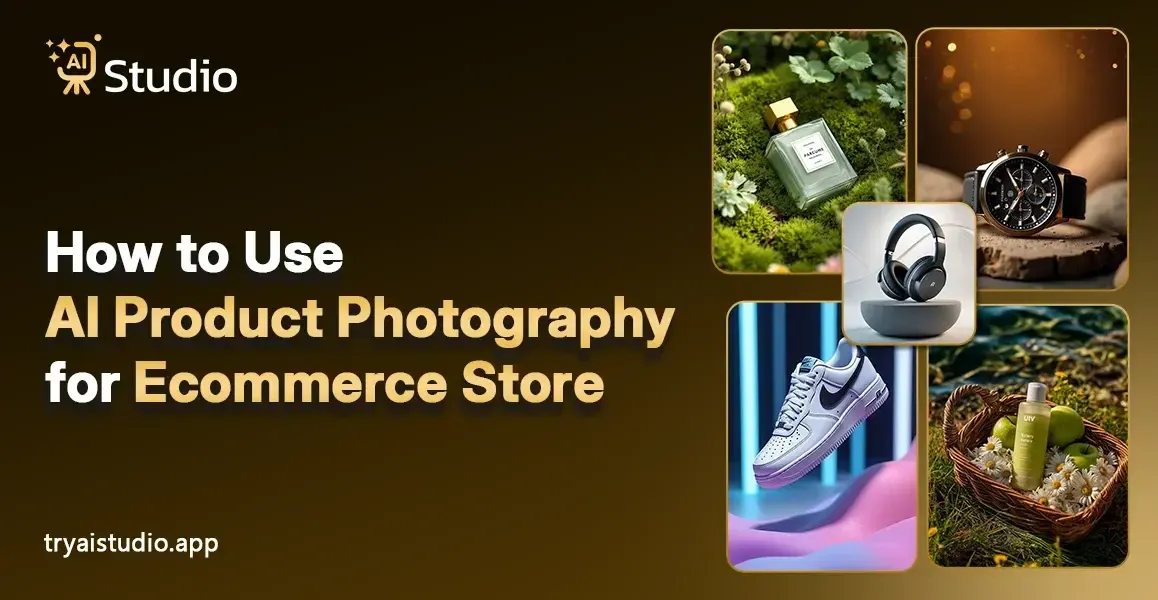
Ecommerce businesses on Amazon, Flipkart, and Shopify need to understand that product images hold essential value for their operations. A blurry or dull image can kill a sale before a customer even reads your product title.
The development of artificial intelligence for ecommerce product photography has enabled Indian sellers, D2C brands, and small business owners to create exceptional product images at low expense. If you want to understand exactly how AI product photography changes everything, you will be amazed to learn about this system because its benefits will become clear to you entirely.
I have observed multiple sellers who face challenges with their product images. Their total expenses reach between ₹15,000 and ₹40,000 for their single photo shoot, which requires them to wait several weeks before receiving processed photographs that fail to generate sales. The good news is there is now a smarter, faster, and far more affordable way to get the job done.
What Is AI Product Photography and Why Does It Matter
I will present my explanation using basic words. AI product photography involves the use of artificial intelligence technology to create and modify product images without the need for actual photo shooting. You can skip studio booking, photographer hiring, lighting, and prop setup because the AI system will handle everything after you upload a product image.
People should consider this situation from another perspective. Jewelry brands in Surat and clothing brands in Tirupur no longer require model flights to Mumbai because they can now create on-model AI fashion photos without a model, generate clean white backgrounds, and place their products in lifestyle settings within seconds.
This matters because:
- Product images directly affect your click-through rate and conversion rate on platforms like Amazon and Flipkart
- Buyers trust listings with high-quality, consistent photos
- Poor images lead to high return rates because customers feel misled
- Great visuals build brand credibility faster than any ad copy
Here's the reality. Most small business owners in India cannot afford professional photoshoots every time they launch a new product or a seasonal variant. AI product photography for small businesses fills that gap perfectly.
The Real Problems with Traditional Product Photography
I have partnered with numerous ecommerce businesses and direct-to-consumer brands, and I found their challenges to be nearly identical in every case. I will explain the entire situation to you in a truthful manner.
The High Cost of Photoshoots
A decent product photoshoot in India costs anywhere from ₹10,000 to ₹50,000. The total expense covers studio rental cost, a photographer's payment, model fees, and post-production editing work. For a small business owner launching 20 to 30 SKUs, this becomes a major budget issue.
Seasonal products require you to produce new product images for each upcoming season. The costs pile up fast.
Finding the Right Models and Studios
Sourcing a model for a product photoshoot becomes challenging because agencies require time to answer, and their availability depends on their work schedules, plus they need to complete the entire process of styling, makeup and coordination. The situation becomes exhausting for a bootstrapped brand because of these requirements.
Many sellers end up using non-professional photos taken on a phone, which directly hurts their brand perception on platforms like Shopify or Amazon.
Inconsistent Image Quality Across Products
The most significant issue I have encountered is that people fail to maintain consistent behavior. Your company uses two different photographers to take product photographs. The lighting, background, and image tone do not match between the two sessions. Your product listing appears unprofessional because of this element, which decreases customer trust.
Slow Turnaround Time
People who practice traditional photography must spend time waiting between different stages of their work. The process begins with shooting, which leads to a waiting period of 5 to 10 business days for editing work to finish before the team carries out revisions and finally delivers the completed project. Your business will lose actual revenue through this waiting period when you need to start selling products during Big Billion Days or festive season sales.
This is exactly why Indian brands are switching to AI photography at a much faster pace than ever before.
What Is an AI Image Generator and How Does It Work for Products
An AI image generator uses your current product photo to create enhanced and retouched images which it places in completely new environments through machine learning technology. You do not need any design skills or photography knowledge.
Here is how the process typically works:
- You upload your raw product photo taken on a phone or basic camera
- The artificial intelligence image editor removes the background automatically
- You choose a background style, a lifestyle setting, or a model pose
- The AI generates a professional-looking image in seconds
- You download and use it directly on your product listing or ad
Tools like AI Studio take this a step further. You can generate studio-quality product photos in under 10 seconds, choose from different backgrounds, and even get images that look like they were taken by a professional photographer. And this costs as little as ₹600 per month, which is a fraction of what a single traditional shoot costs.
Key Benefits of AI Product Photography for Indian Sellers
Please let me supply you with the obvious value if you are a seller on Amazon India, Flipkart, or run a Shopify store.
No Studio or Photographer Needed
This particular victory stands as the largest accomplishment. You do not need to book a studio or hire anyone. The AI product image generator creates your product image after you upload your product photo. Sellers in smaller cities like Jaipur, Indore, or Coimbatore who previously had limited access to professional studios now possess the ability to compete with major urban brands.
If you want to go deeper, read about creating product photos without a photoshoot and see how straightforward the process really is.
Generate Images with Models Without Hiring Models
Fashion brands now enter their most exciting time. AI fashion photography generator tools show your clothing and accessories through virtual models who create the aspirational lifestyle appearance that customers want to see. The AI fashion photos on models function without actual models, which helps you to save thousands of rupees every month.
The AI Studio system enables brands to generate uniform product images because it eliminates the need for model hiring, which results in impressive outcomes.
Consistent Look Across Your Entire Catalog
When you use an AI product photography tool, every image follows the same style, lighting, and background format. The company establishes its brand identity through consistent design elements, which create professional and trustworthy product displays.
Fast Turnaround, Ready in Seconds
You no longer need to wait a week for your edited photos to arrive. The AI product photography generator produces images within seconds. The high-demand periods of Diwali and Eid holiday seasons provide businesses with a competitive advantage through their fast operational capabilities.
Works Across Multiple Categories
Whether you are selling jewelry, fashion accessories, home decor, or electronics, AI product photography tools handle a wide variety of product types beautifully.
- AI jewelry product photography tool for clean, detailed gemstone and metal shots
- AI fashion photography generator for clothing and accessories
- Ecommerce photography AI for electronics and lifestyle products
- AI background generator for ecommerce product photography for consistent catalog images
How to Use AI Product Photography Step by Step
The practical section begins here. I will show you how to create product images with AI Studio through a detailed demonstration. You need no design skills, and you need no photography experience to complete this task. The entire process requires less than 10 minutes to build your first image.
Step 1: Create a Free Account and Log In
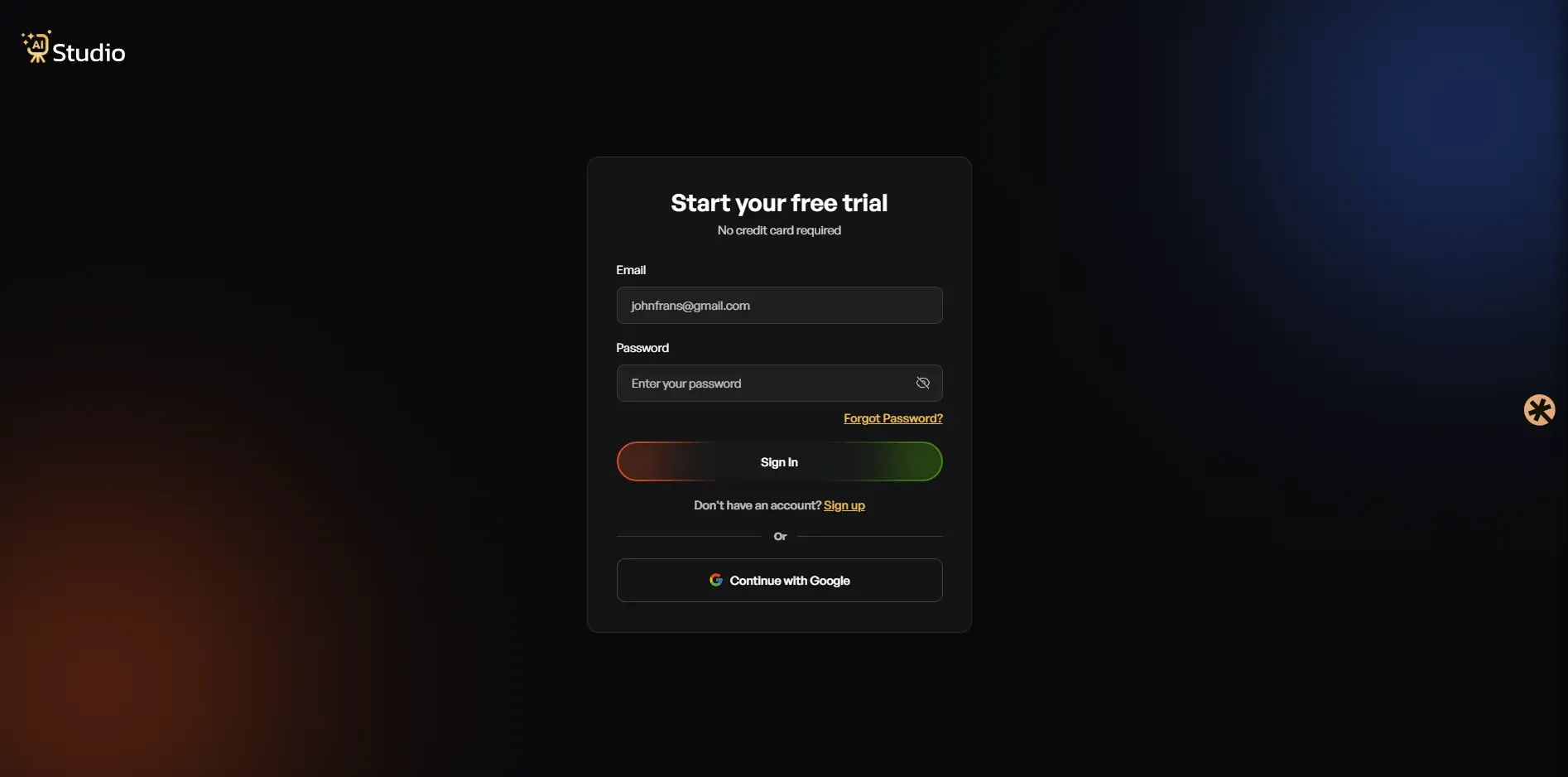 Go to tryaistudio.app and sign up for free. No credit card needed to get started. Once you log in, your dashboard opens, and you are ready to go.
Step 2: Choose Your Studio
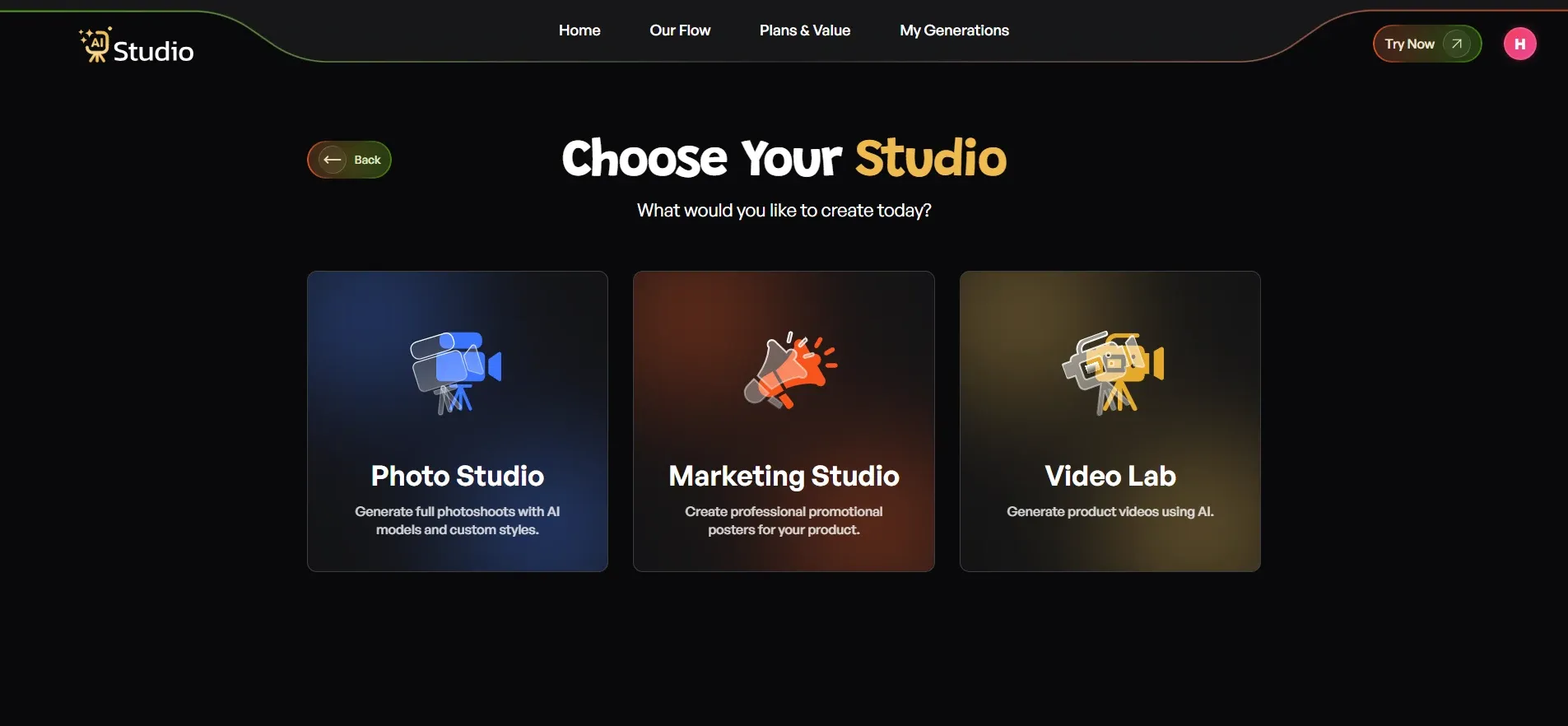 Inside the dashboard, you will see three options: Photo Studio, Marketing Studio, and Video Lab. For AI product photography, click on Photo Studio. This location serves as the site where all product images are developed.
Step 3: Select Your Category
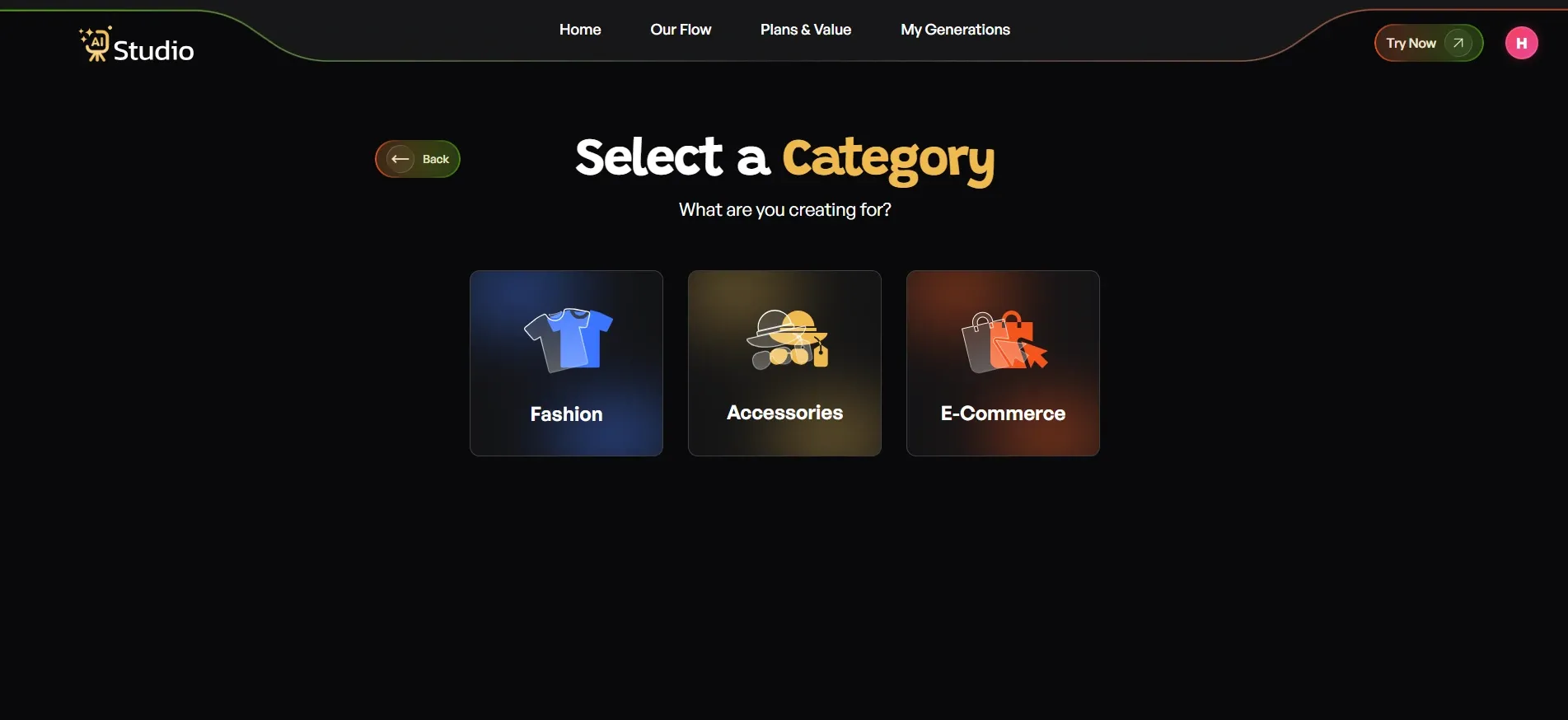 The tool will ask what your creation is for. You will see three main categories:
- Fashion for clothing like kurtas, t-shirts, dresses, or ethnic wear
- Accessories for watches, jewelry, bags, belts, or sunglasses
- E-Commerce for general product listings like electronics, home goods, and beauty products
Select the category that matches your product. If you choose Fashion or Accessories, you will then pick a subcategory: Women, Men, or Kids. This feature enables the AI to determine which virtual model should be used for your product image.
Step 4: Select Your Sub Category
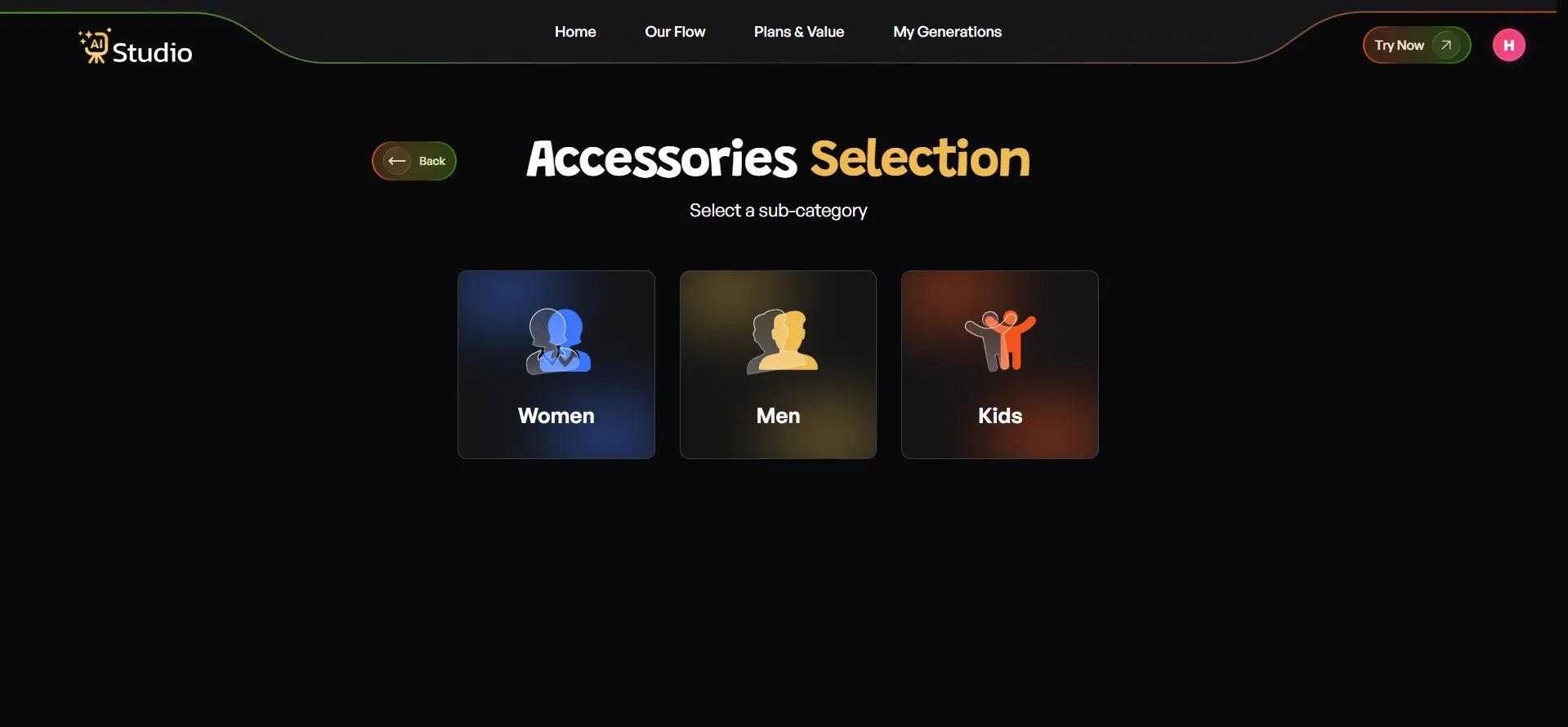 You should first choose your main category before selecting the subcategory that matches your product. The tool will direct you to the upload screen after you complete the previous step.
Step 5: Upload Your Product Photo
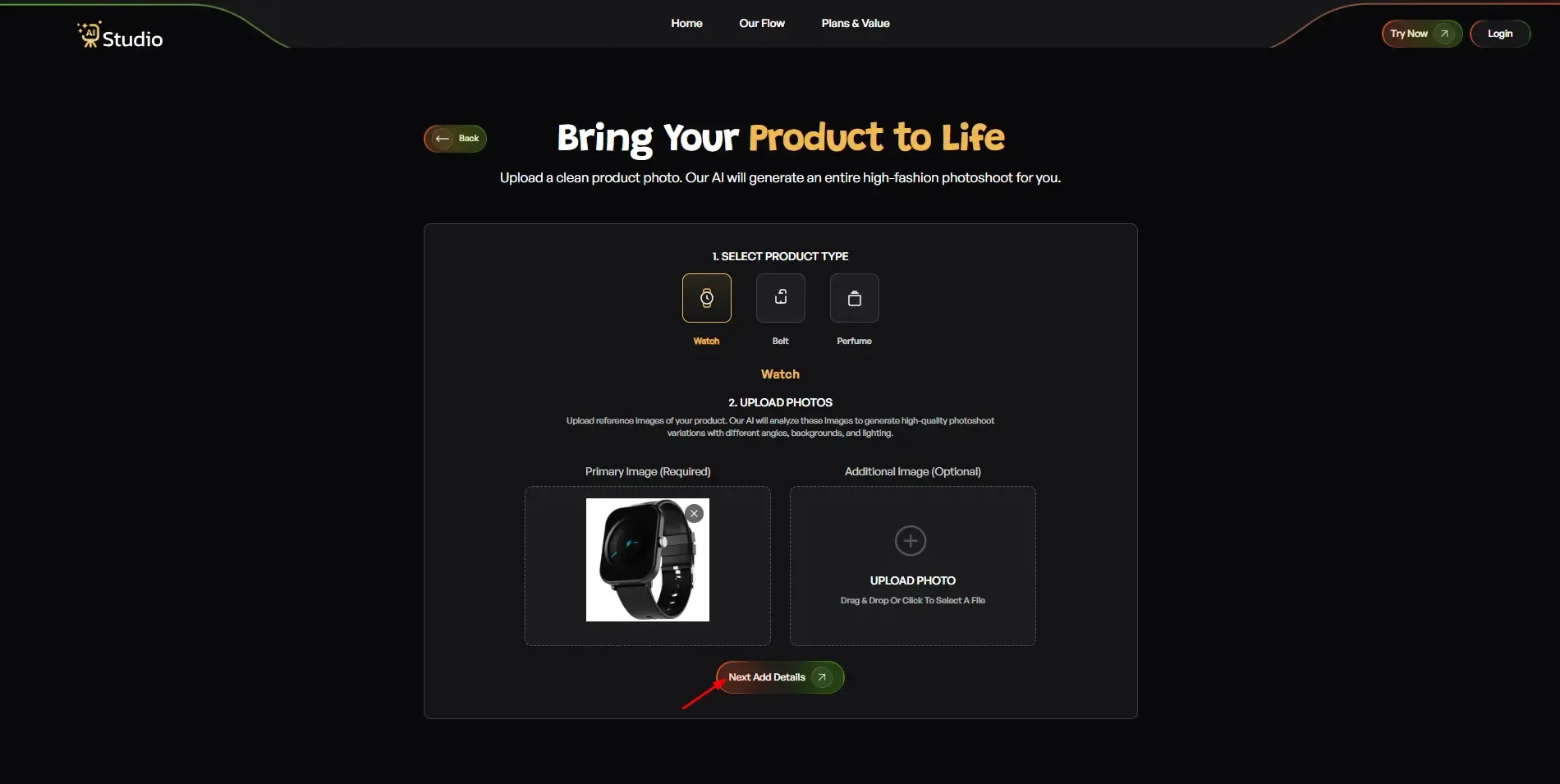 Here, you need to select your specific product type, such as a Watch, Belt, Perfume, Wallet, Sunglasses, or any other accessory. After selecting the product category, upload a Primary Image that clearly shows the front-facing view of your product, as this image is required for the best presentation. You can also upload an Additional Image from a different angle if available.
While optional, adding a second image helps provide a better view of accessories and improves the overall product showcase.
Your source photo works best with a plain white or light-coloured background. Any phone photo is fine as long as it is in focus and the lighting is decent. Click Next: Add Details when you are done.
Step 6: Fill In the Final Details
This is where you customize your output. You will see several options:
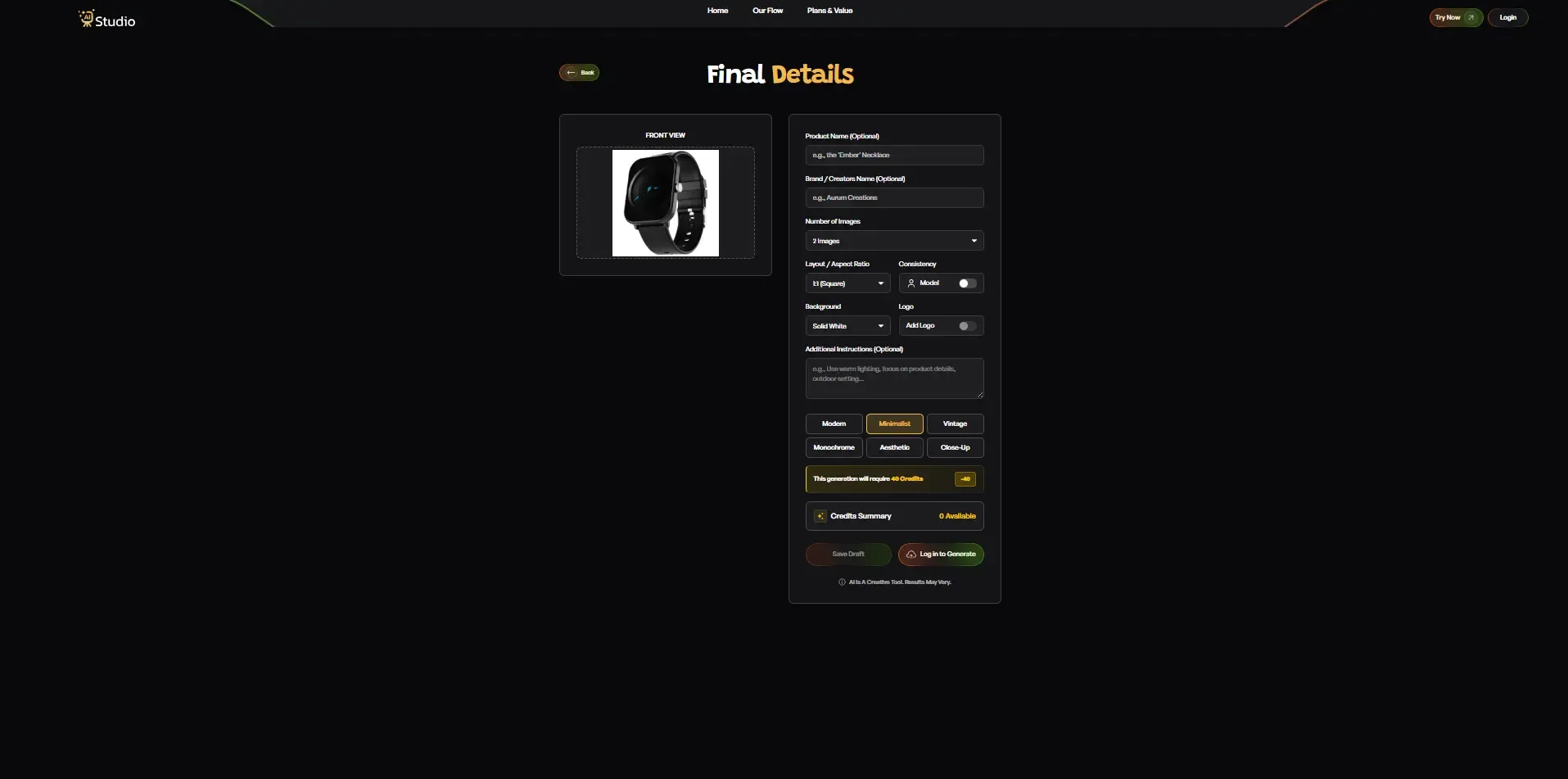
- Product Name and Brand Name (optional, helps with consistency across your catalog)
- Number of Images you want generated (2, 4, or more)
- Layout or Aspect Ratio: 1:1 Square for Amazon and Instagram, 4:5 for Instagram feed, 16:9 for banners
- Model Consistency toggle: Turn this on if you want the same model to appear across all generated images for a catalog shoot
- Background: Solid White works best for Amazon's main images; other options suit lifestyle scenes
- Style: Choose from Modern, Minimalist, Vintage, Monochrome, Aesthetic, or Close-Up
- Logo: Add your brand watermark if needed
- Additional Instructions: For example, "Use warm lighting, outdoor setting, focus on product details."
Once everything looks right, click Generate Images.
Step 7: Download Your Image
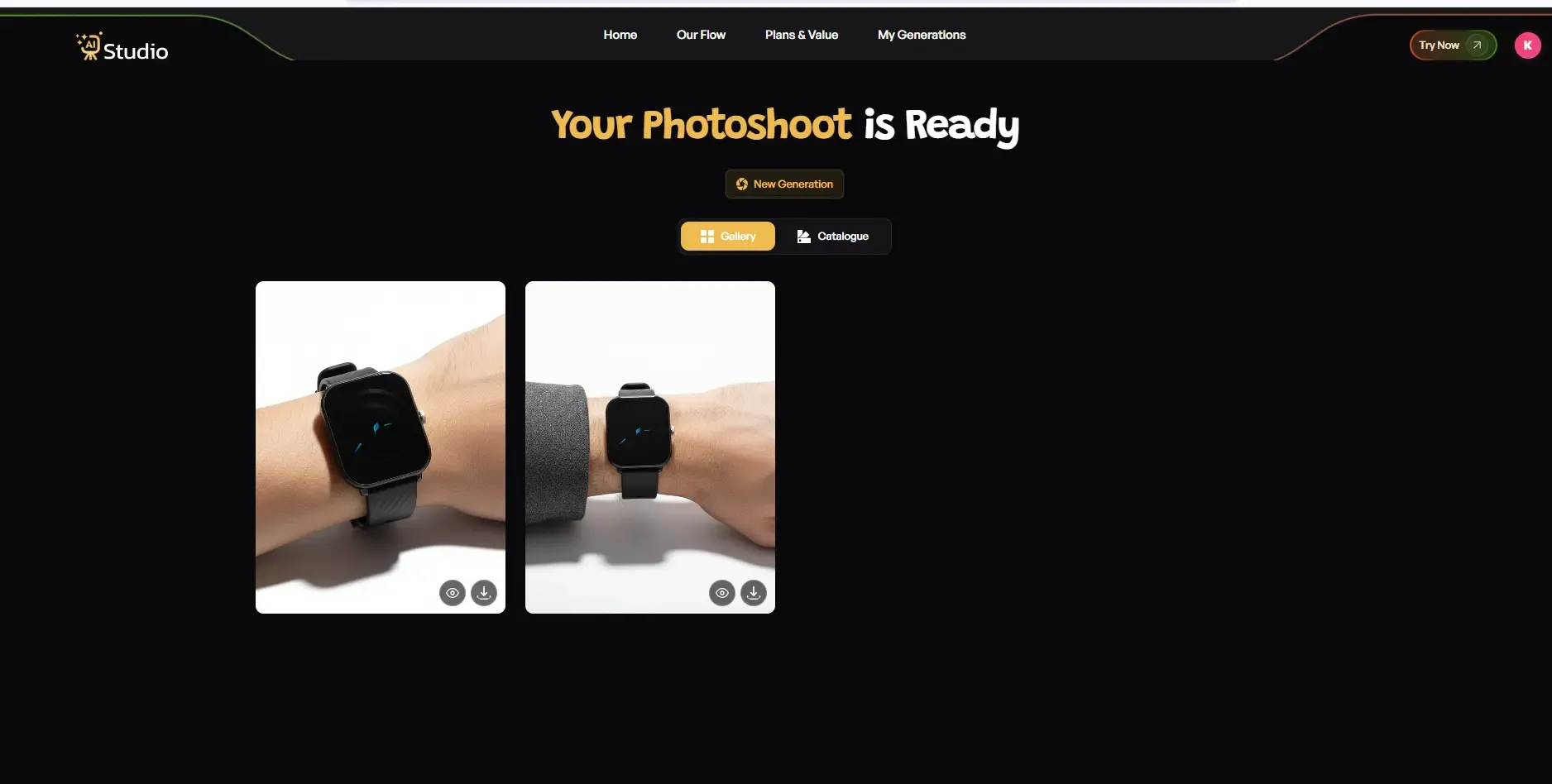
Your product image design will be completed within 10 seconds because it includes both a virtual model and a professional scene. You can download the content in full resolution which will become instantaneously available for your Amazon listing, Flipkart catalog, Shopify store, and Instagram page.
The process requires no retouching because there is no need to wait for a photographer and no need to conduct edit revisions.
AI vs Traditional Product Photography: An Honest Comparison
I wish to help you see the fullest picture possible for the sake of making the best decision.
| Factor | Traditional Photography | AI Product Photography |
|---|---|---|
| Cost | ₹10,000 to ₹50,000 per shoot | Starting from ₹600/month |
| Time | 1 to 2 weeks | Under 10 seconds |
| Models Needed | Yes, requires booking | No, AI generates model images |
| Studio Required | Yes | No |
| Consistency | Varies by shoot | Always consistent |
| Scalability | Slow and expensive | Scale hundreds of images fast |
| Beginner Friendly | Needs expertise | Anyone can use it |
The comparison speaks for itself. For a deeper breakdown, check out this detailed look at AI product photography vs traditional shoots.
Small and mid-size e-commerce businesses face an uncompetitive battle when they choose between AI product photography and traditional studio methods. Traditional photography maintains its value for high-end fashion campaigns which large brands execute. AI product photography tools provide better options for most sellers who read this.
How AI Product Photography Helps Improve Your Amazon and Flipkart Listings
The truth about the situation shows that Amazon and Flipkart establish image rules which their users must follow. The requirements include white backgrounds, a minimum resolution, no watermarks, and high clarity. The traditional photography process requires extra time and costs to fulfill these specific requirements.
The platform requirements for your product listings can be fulfilled through an AI system that creates product images. The best AI product photography tools for Amazon sellers are specifically designed to output images that comply with Amazon's listing standards.
Some things you can do with AI product photography for ecommerce:
- Generate multiple angles from a single photo
- Create A+ content visuals for Amazon
- Produce comparison images
- Generate infographic-style listing images
- Create mobile-optimized thumbnail images
Sellers who changed their product images from phone photos to AI-generated studio-quality images achieved better click-through rates. The platform algorithm ranks products based on the relationship between better images and increased user clicks and product conversion rates.
Best AI Tools for Product Photography in 2025
Several AI-focused product photography tools have been launched recently, so I will guide you about the critical things to observe while choosing a tool.
What to Look for in an AI Product Photography Tool
A good AI tool for product photography should offer:
- Easy upload and one-click background removal
- Multiple background options, including lifestyle and plain studio
- Model integration for fashion products
- High-resolution output suitable for ecommerce listings
- Batch processing for sellers with large catalogs
- Affordable pricing for small businesses
For a full side-by-side review, this guide on the best AI tools for product photography in ecommerce covers everything you need to evaluate before making a choice.
AI Studio: A Practical Option for Indian Sellers
AI Studio (tryaistudio.app) is one of the tools I've seen many Indian ecommerce sellers and D2C brands use with real results. It covers all the key requirements:
- No studio or photographer needed
- No models required for fashion images
- Pricing starts at just ₹600/month
- Image generation in under 10 seconds
- Consistent quality across all product types
- Works for fashion, jewelry, accessories, and general ecommerce
The affordable product photography AI system delivers results that users should test because they will find the system effective. Many sellers use the free trial to test it with their actual products before committing.
Other Considerations
When comparing AI product photography software, you should verify its bulk upload capability because it is necessary for your extensive product collection. You must confirm that the output resolution satisfies your platform's specifications. The minimum image requirement for Shopify, Amazon, and Flipkart platforms is 1000x1000 pixels or higher.
AI Product Photography for Fashion and Jewelry Brands
Product photography could be ranked as a very difficult and costly task in the fashion and jewelry domains.
Fashion Brands
Clothing brands need to display their products on models because this practice has become essential for their business operations. Buyers want to see how it fits, how it drapes, and how it looks in real life. However, the process of hiring models requires both financial resources and extended periods of work.
AI fashion photography generator tools create a complete solution for this particular issue. The system enables users to create on-model images by using flat lay and mannequin photographs as their starting point. Your salwar suit or kurta gets placed on a virtual model, styled naturally, and ready for your catalog in seconds.
Learn more about how brands are generating on-model fashion shots without hiring models and what the results look like in practice.
The online fashion industry development represents a major opportunity for small fashion brands based in Surat, Jaipur, and Chennai to compete against larger fashion labels.
Jewelry Brands
Jewelry photography requires exact lighting conditions to show both metal and gemstone properties. The traditional method demands specific tools that trained professionals must operate to achieve accurate results.
The AI jewelry product photography tool automatically enhances product details through intelligent processing while adding reflective lighting effects and showing the jewelry against luxurious backgrounds. The final output resembles a high-end studio product yet maintains an affordable price point.
You can also use the AI product photography tool for accessories to handle watches, bags, and other detailed product types with the same level of quality.
Product Photography Tips for Sellers Using AI Tools
Your input photo maintains its importance even when you use an AI product photography application. The following product photography tips for ecommerce sellers provide quick methods to achieve optimal results.
- Use good natural light or a basic ring light when taking your original product photo
- Keep the product clean and free of fingerprints or dust before shooting
- Shoot against a light-colored background for easier AI processing
- Take multiple angles of the product, even on a phone; AI works better with more input options
- Avoid heavy shadows in your original photo, as they can sometimes confuse the AI tool
Make sure every little step has been undertaken to follow: make the perfect appearance of AI product photography for your customers.
How Much Does AI Product Photography Cost in India
I could provide the details that you may want so you could plan accordingly.
Traditional photoshoot costs for a typical ecommerce seller in India:
- Studio rental: ₹3,000 to ₹8,000 per day
- Photographer: ₹5,000 to ₹15,000 per day
- Model (if needed): ₹5,000 to ₹20,000 per day
- Post-production editing: ₹2,000 to ₹8,000
- Total for a basic shoot: ₹15,000 to ₹50,000+
AI product photography tools pricing:
- Basic plans starting from ₹600 to ₹2,000 per month
- Most plans include 50 to 200+ image generations per month
- No additional cost for backgrounds, editing, or model images
The math is very straightforward. For a seller launching new products every quarter, switching to an ecommerce photography AI tool can save lakhs per year while maintaining or even improving image quality. You can also check out the free AI product image generator options if you want to test before you invest in a paid plan.
Conclusion
Indian ecommerce businesses and D2C brands face their greatest hurdle in product photography. The complete expenses of using standard shooting methods increase at a rapid pace because they require both time and logistical resources. AI product photography for ecommerce is not a future technology anymore. It is something thousands of sellers are already using right now to create professional images faster and at a fraction of the cost.
Fashion, jewelry, and all other product categories need a better method to create their product images. Tools like AI Studio make it possible for anyone to create studio-quality product images without a studio, a photographer, or a model. You should test it yourself to observe its impact on your professional activities.