


AI Product Photography for Accessories: Get Studio-Quality Shots Without a Studio
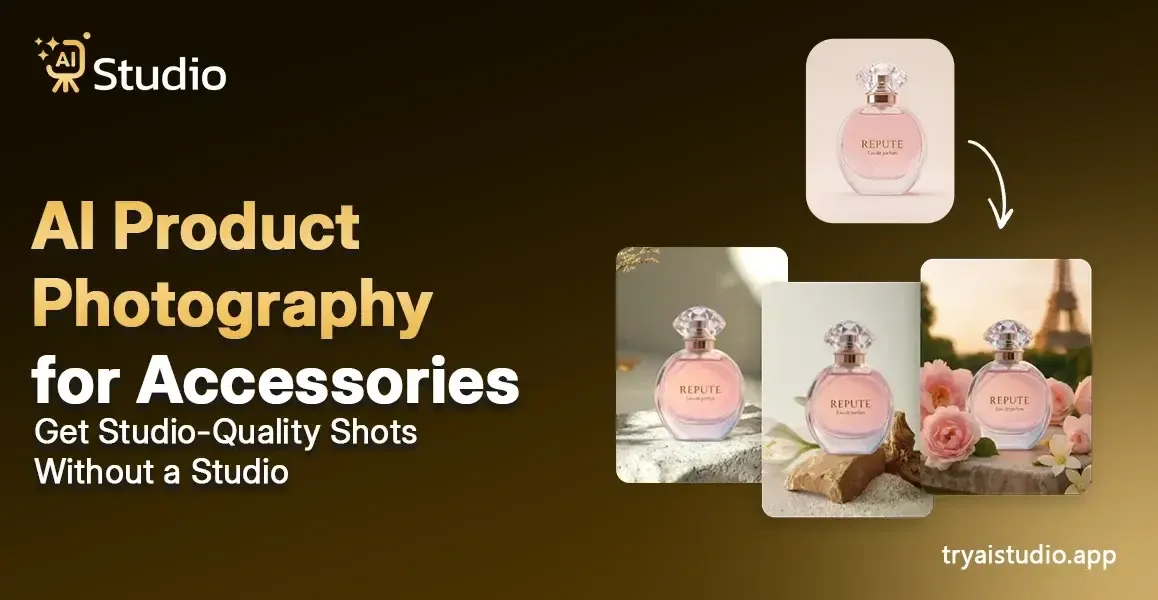
Your search for the ideal bag, sunglasses, and watch lasted for several weeks. The product you created meets your standards of excellence. The images demonstrate the product through basic phone photography, which resembles a parking area snapshot. The results lack proper lighting and a clean background, which results in an unprofessional appearance.
A great product fails to sell because of its presentation, not because of its quality. AI product photography is changing this for thousands of Indian sellers, and if you sell accessories on Amazon, Flipkart, or Shopify, this guide is written for you.
This article presents AI product photography as the main subject and covers accessory photography difficulties, effective shooting methods, and how small business owners use AI Studio to generate professional images without studio time or photographer costs.
What Is AI Product Photography and Why Accessories Brands Need It
Your explanation will begin with a basic demonstration that shows two separate worlds. The first world requires you to spend between ₹15,000 and ₹50,000 for each shoot because you must organize photographer services and studio space, and wait several days to receive edited photographs. The new world provides instant professional product photography results, which require users to upload only one product image.
AI product photography uses artificial intelligence to transform a basic product photo into a polished, studio-ready image. A complete lighting system requires no setup. A photographer is not needed. The studio space costs nothing to rent. The user needs to take a product photo, which will be processed by an advanced system to produce results.
The Traditional Photography Problem for Accessories
The statement you made about accessories being difficult to photograph accurately exists as the actual truth. Jewelry has reflective surfaces that pick up every shadow and imperfection. The premium appearance of bags depends on their textured surfaces, which require specialized lighting methods. The small size of sunglasses and watches creates customer confusion when proper size information is not provided. Basic cameras cannot provide the necessary detailed views that earrings and rings require for proper visibility.
Many sellers face difficulties with this problem. The two options available to them include spending large amounts of money for professional studio shooting or using low-quality photos that display inconsistent lighting. The middle ground used to not exist.
Ecommerce photography AI technology provides the required solution for this situation. A good AI product image generator reads your product's shape, texture, and details from a single uploaded photo and builds a clean, professional image around it. The system automatically manages all aspects, which include shadows and backgrounds, lighting angles, and model presentation.
- Reflective surfaces on jewelry, handled with AI-controlled lighting
- Texture details on bags and wallets are preserved accurately
- Scale communication for small accessories, solved with context shots
- Background consistency across your entire catalog, automated
How AI Product Photography Works
AI Studio operates as a standard AI product photography generator through its established workflow system.
- Upload your product photo. Even a smartphone photo against a plain wall works. The AI needs to see your product's shape and details clearly.
- Choose your style and background. You can pick studio white, lifestyle settings, flat lay, or even on-model shots.
- Generate and download. The AI builds the image, adjusts lighting and shadows, and delivers a high-resolution, watermark-free photo in seconds.
That is it. No Photoshop skills needed. No design experience required.
Best AI Shot Styles for Accessories
This is the point where actual helpfulness begins. The effectiveness of different shot styles for accessories varies. Research shows which styles most effectively convert customers on Indian ecommerce websites.
The AI product photography tool provides users with multiple visual options. The same base photo allows you to create different styles, which you can use to determine the most effective option for your product listings.
Clean White Background Shots
This is the non-negotiable style for Amazon India listings. Amazon requires a product image to use a pure white background, which has an RGB color value of 255 255 255. If your image has a colored background or props in the main slot, your listing can get flagged.
The ecommerce AI photo creator uses an AI system to create automatic background removal. The system takes your accessory input and removes its original background while displaying your product on a white surface with corrected lighting for Amazon image requirements.
Sellers who want to know how to enhance their Amazon listing images should use this method because it provides instant results.
Lifestyle and Flat Lay Shots
Flat lay photography is one of the most popular styles for accessories, especially on Instagram and Shopify stores. A sunglasses brand can showcase its product on a marble surface together with a coffee cup and a notebook. A bag brand displays its product on a wooden table while natural light enters the room from the side.
An AI product background generator lets you choose surface materials, prop styles, and lighting moods without any physical setup. The AI creates the scene based on your description or your selection of predefined themes.
On-Model Shots Without a Model
The main benefit that AI product photography with models brings to accessory brands remains mostly unknown to most brands at this point.
A scarf brand serves as an example. The model display of the scarf shows its draping properties, neck fitting characteristics, and actual size appearance. The expense of booking a model in India ranges from ₹5,000 to ₹20,000 for a half-day shoot. The requirement for different models to serve multiple markets results in instant cost increases that multiply quickly.
AI fashion photography generator tools enable users to create AI fashion photos through model generation without needing actual model shoots. The user uploads an accessory, and the AI software creates a simulated model that displays the accessory. The user can select from different styling options, body types, and background environments. The output creates an authentic fashion display that requires no expensive shoots.
Many D2C jewelry brands use this technology to display their necklaces, earrings, and bangles on models through their Instagram feeds, created in under five minutes at a cost far lower than conventional methods.
Macro and Detail Close-Up Shots
Buyers require proof of material quality because they need to examine the watch, earring, ring, and sunglass accessories closely. A distant product shot does not cut it.
AI product photography tools use deep learning technology to produce close-up detail shots, which display surface textures and stitching details of leather bags, stone settings of rings, and lens properties of sunglasses. The combination of strong contrast, defined shadows, and controlled lighting creates an effect that makes a small product appear to have high value, which justifies its cost.
This style provides optimal advantages for producing high-quality AI product photography for jewelry because buyers need to observe complete details before making buying decisions.
Step-by-Step: How to Use AI Product Photography for Your Accessories
Here is the entire procedure demonstrated through AI Studio (tryaistudio.app). It serves as one of the most effective and budget-friendly AI product photography solutions for Indian sellers. The entire process requires under 10 minutes to complete because you can begin without any design or photography skills.
Step 1: Create a Free Account and Log In
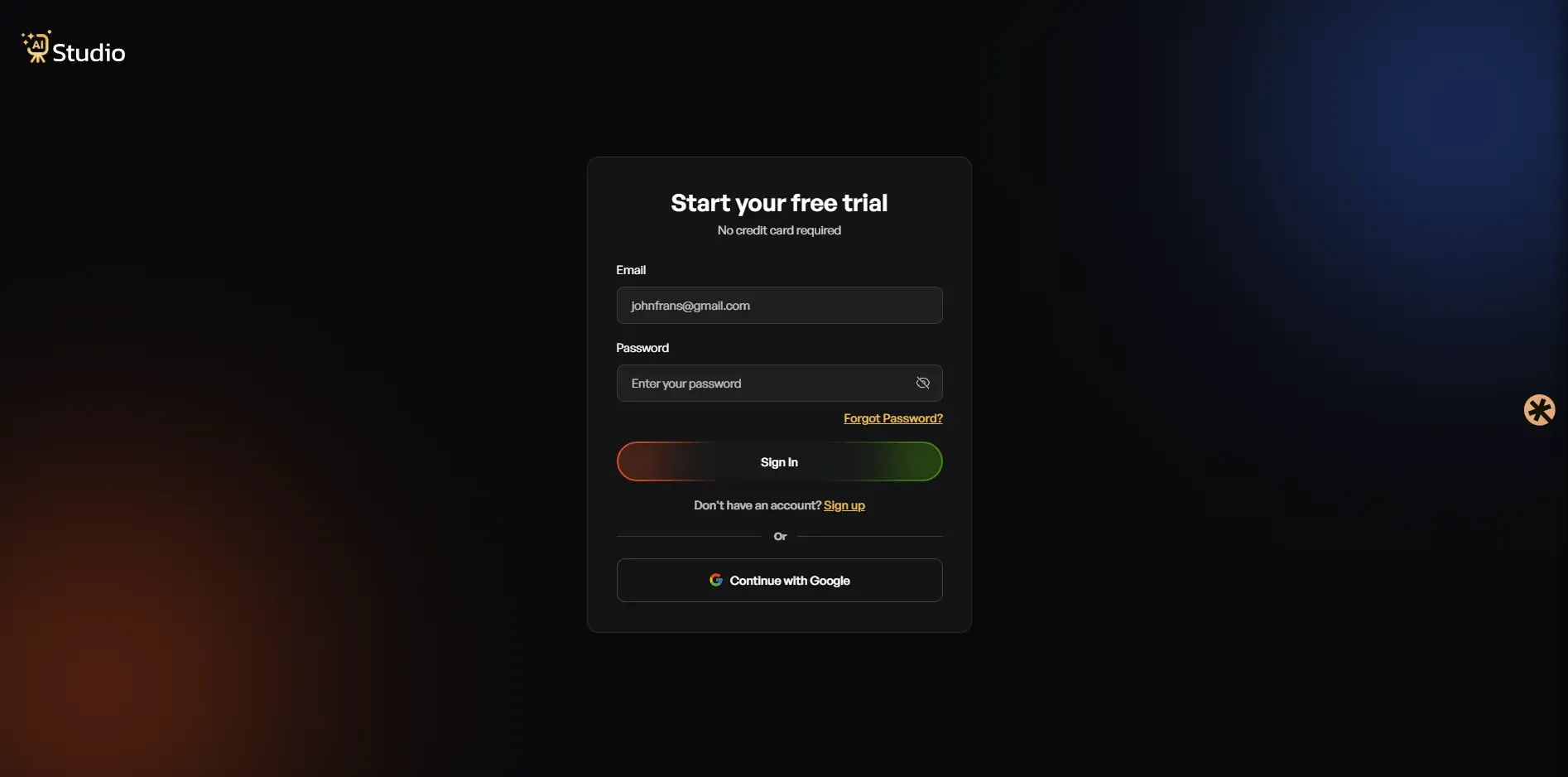
You can access tryaistudio.app to create a free account. The service starts without any credit card requirement. Your dashboard becomes accessible after you log in, which allows you to start using the system.
Step 2: Choose Your Studio
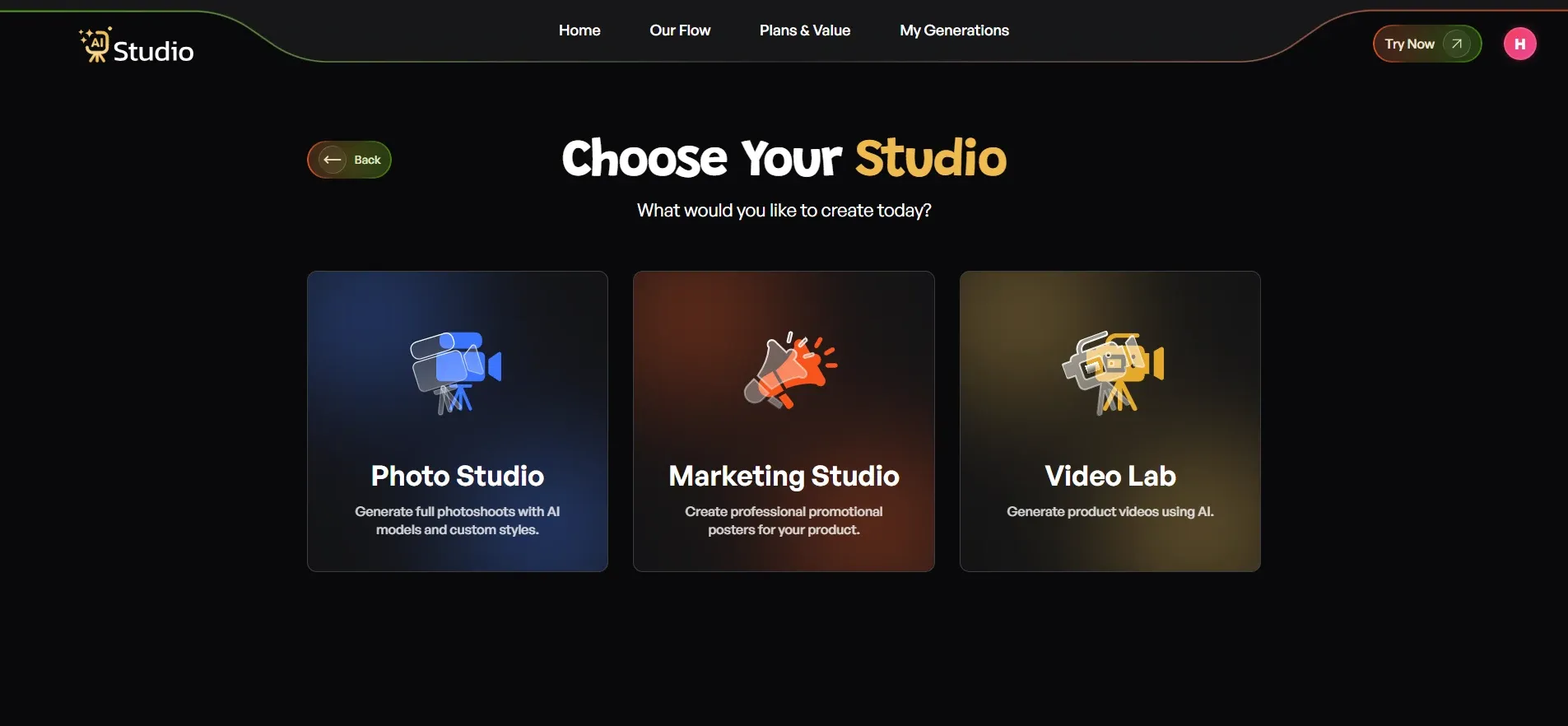
The dashboard provides users with three available choices, which include Photo Studio, Marketing Studio, and Video Lab. For AI product photography, select Photo Studio. This is the location where all product images are created.
Step 3: Select Your Category
When you are setting up your creation, the platform may ask you what it is for, with three main categories to choose from.
- Select Fashion as your category when you sell clothing items, which include kurtas, t-shirts, dresses, and ethnic wear.
- Select Accessories as your category when you sell products which include watches, jewellery, bags, belts, and sunglasses.
- Select E-Commerce as your category to display all types of products, which include electronics, home goods, and beauty products.
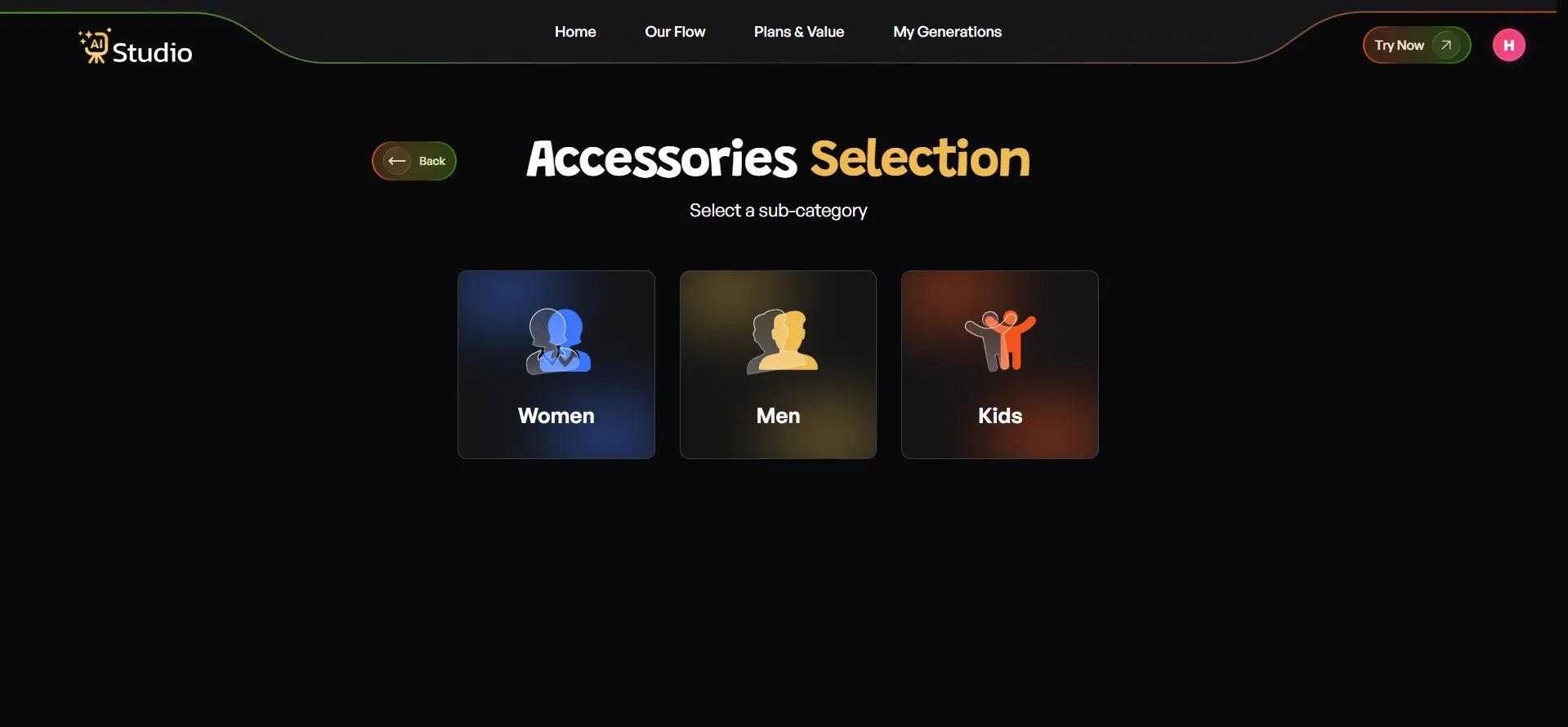
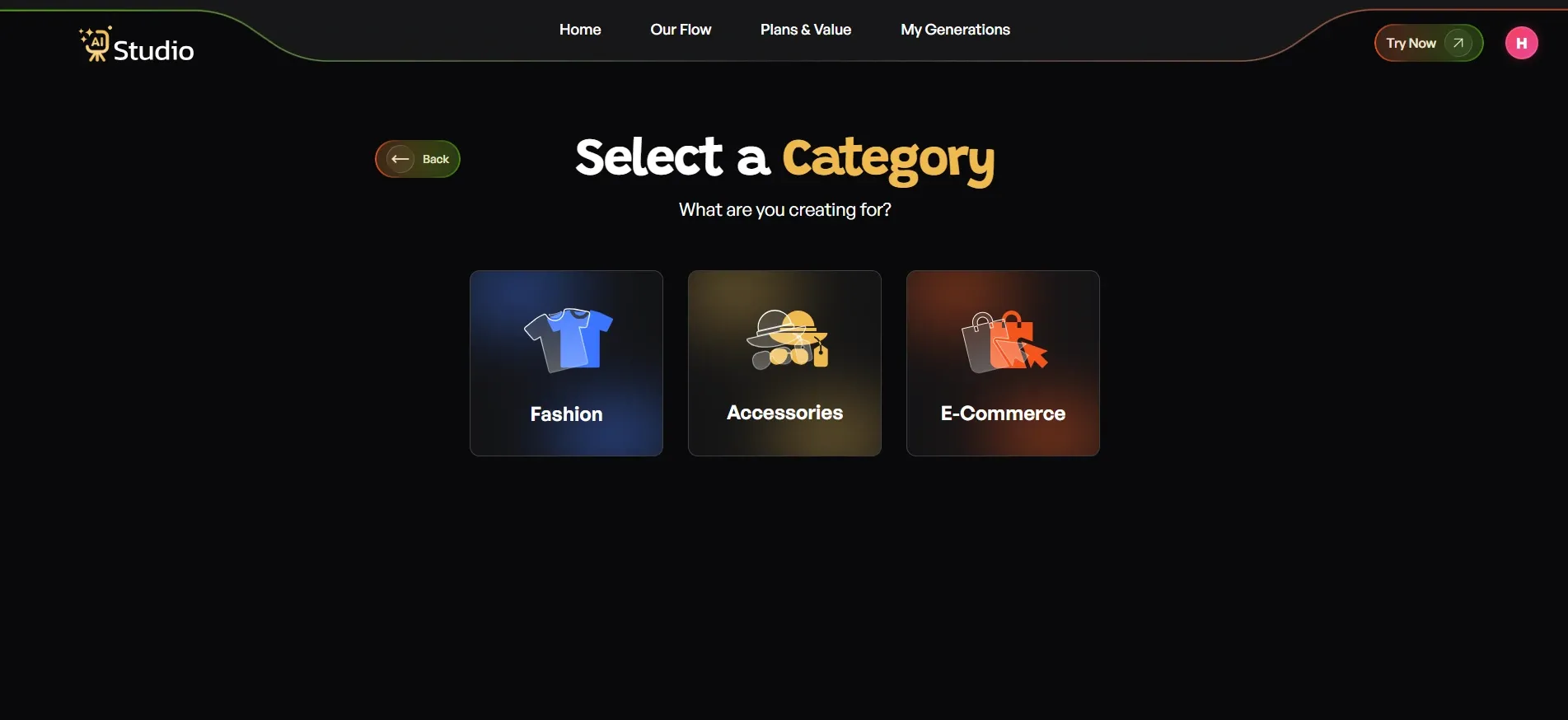 After selecting your primary category, you will choose a subcategory. For Fashion and Accessories, you pick Women, Men, or Kids. The system uses this information to create a virtual model that matches your product specifications.
Step 4: Select Your Sub-Category
Now select your specific subcategory. For accessories, this is where you tell the platform exactly what kind of product you are working with. You must first make your selection before you can move to the next step of uploading products.
Step 5: Upload Your Product Photo
This is the most important step. Here is what to do:
- Select your specific product type. For accessories, this includes options like a watch, a belt, perfume, a bag, and more.
- Upload a Primary Image, which should be a clear front-facing photo of your product. This is required.
- Add a second angle if available. This is optional, but recommended for accessories like jewellery and bags.
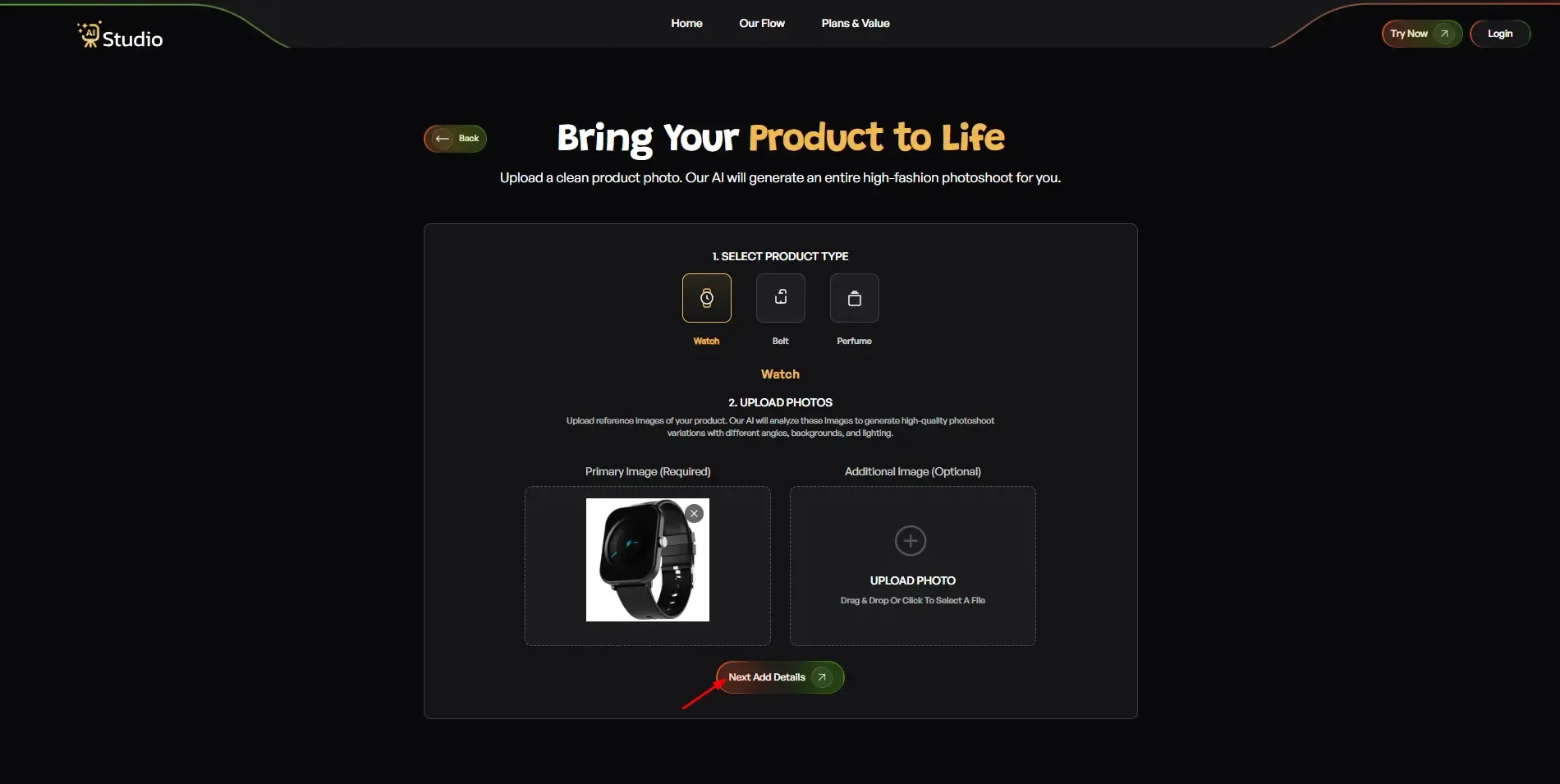
Your source photo works best with a plain white or light-coloured background. You can use any in-focus phone photo that has good lighting conditions because it will produce better results. After you upload your images, select Next: Add Details to continue.
Pro tip: For jewellery, place the piece on a flat white surface and photograph from directly above. The AI can view the design and finish through this method because it provides maximum visual detail.
Step 6: Fill In the Final Details
- Add your Product Name and Brand Name (optional, but helps with consistency across a catalog)
- Set the Number of Images you want generated: 2, 4, or more
- Choose Layout and Aspect Ratio: 1:1 Square works best for Amazon and Instagram, 4:5 for Instagram feed, 16:9 for banners and ads
- Toggle Model Consistency on if you want the same model across all generated images. This is highly recommended if you are building a full accessories catalog
- Choose a Background: Solid White works best for Amazon main images; other options suit lifestyle and Shopify scenes
- Pick a Style: Modern, Minimalist, Vintage, Monochrome, Aesthetic, or Close-Up
- Add a Logo if you want your brand watermark included
- Write any Additional Instructions if needed, for example: "Use warm lighting, outdoor setting, focus on product texture and details"
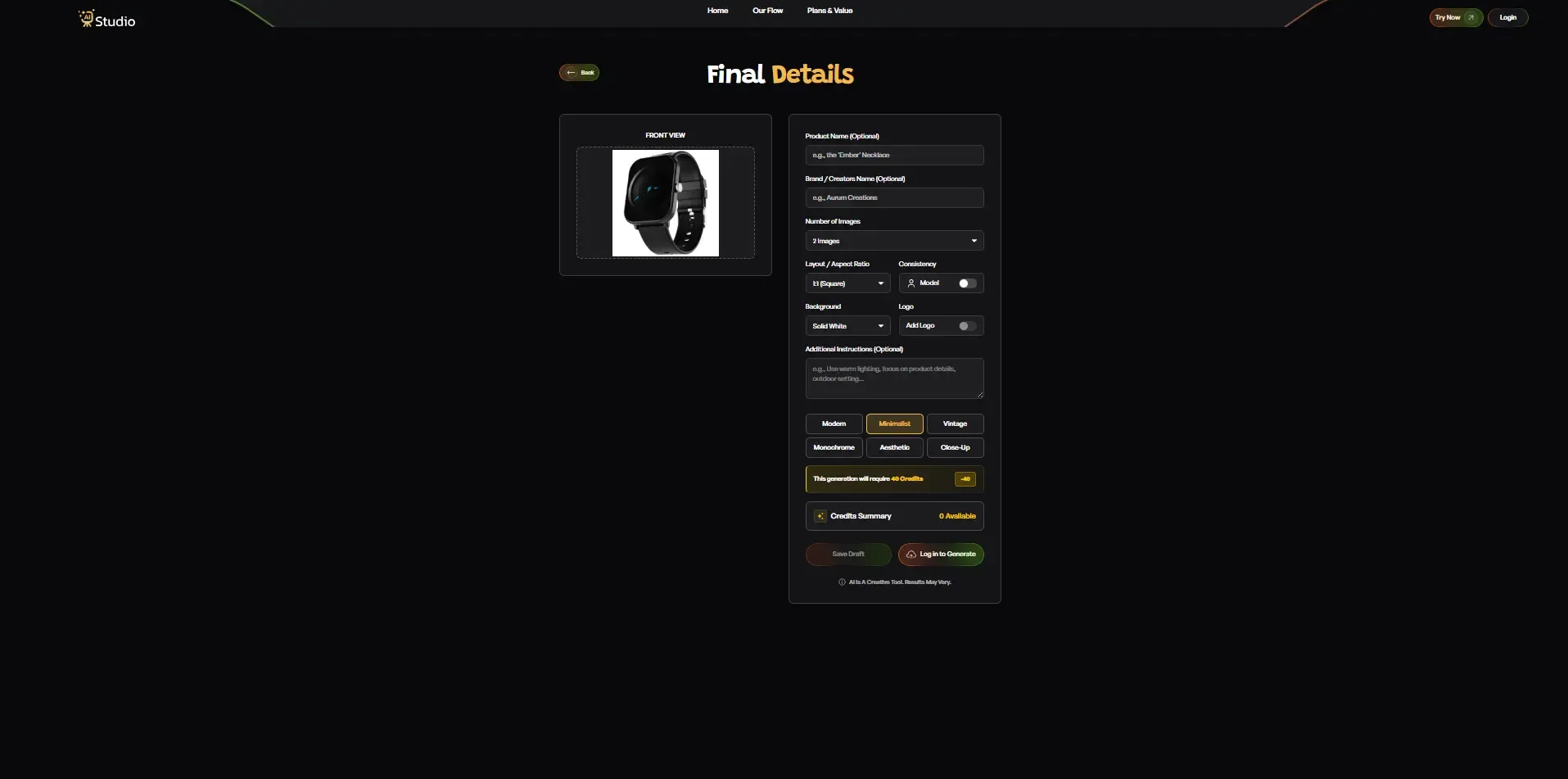
Once everything looks right, click Generate Images.
Step 7: Download Your Image
The product shows itself within 10 seconds through its display in professional studio environments or its use of virtual models. You can download the image at full HD resolution with no watermark. The product becomes instantly available for your Amazon listing, Shopify store, Flipkart catalog, and Instagram page.
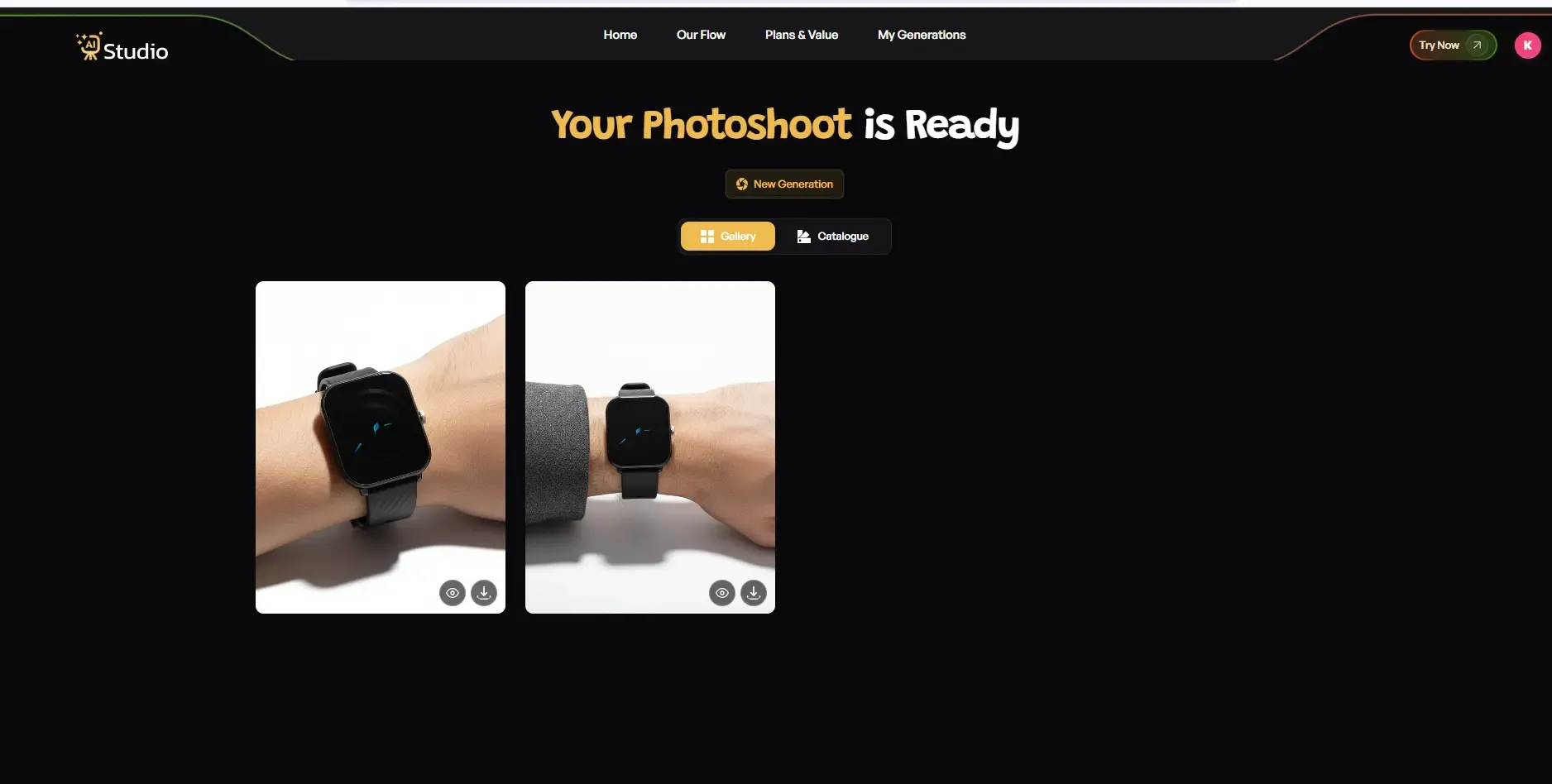
The process needs no retouching work and does not require any waiting time for a photographer, and it eliminates all need for multiple revision cycles.
Tips for Getting the Best Results
A few small things make a big difference when using any AI product photography generator. These AI product photography tips for ecommerce sellers apply to every platform and product type.
- Use high-resolution source images. Even a 12MP phone photo works well as long as it is in focus.
- Avoid cluttered backgrounds in your original photo. A clean, plain surface gives the AI more accuracy to work with.
- Try two or three background styles before settling on the first result.
- For jewellery and small accessories, use a close-up with good natural light before uploading.
- Turn on the Model Consistency toggle if you are generating a full catalog. It keeps the same model across all images, which looks far more professional on your store.
AI vs. Traditional Product Photography: What Is the Real Difference for Accessories Sellers
People frequently ask this question. "Is AI product photography actually good enough to replace a real studio shoot?" Here is an honest answer.
The method works for all ecommerce purposes because it provides complete white background, lifestyle shots, and catalog images. The material maintains strong quality standards.
Human photographers provide better results for ultra-luxury editorial campaigns and brand storytelling needs. However, for the vast majority of Indian accessory sellers, AI product photography vs traditional shoots shows a clear advantage in cost and speed.
| Traditional Studio | AI Studio | |
|---|---|---|
| Cost per shoot | Rs. 10,000 to Rs. 50,000 | From Rs. 600 per month |
| Turnaround time | 3 to 7 days | Under 60 seconds |
| Reshoots | Extra cost every time | Free and unlimited |
| On-model shots | Requires model booking | Included |
| Background changes | Requires a new shoot | Instant |
| Bulk product images | Very expensive | Scalable |
Research shows that 76% of small businesses using AI photography tools in 2025 achieved cost reductions exceeding 80%. The small accessories brand operating with 50 to 100 SKUs sees this saving as a major financial benefit. The situation creates a business that generates profits or a business that needs to spend money that it does not have.
The choice between AI and traditional product photography methods becomes clear when businesses reach monthly photography costs of Rs. 5,000, which still fail to produce reliable outcomes.
Platform-Specific Tips: Amazon, Shopify, and Instagram for Accessories
Every platform has different visual expectations. Here is what works where.
Amazon India Listings
Your main image must have a pure white background with the product occupying at least 85% of the frame. The image needs to remain free of all props, all text, and all watermarks. The AI tools that operate as an automated product photography solution automatically ensure compliance with this requirement.
You can use lifestyle shots, close-up detail shots, and size reference images as secondary images on Amazon. The AI-generated lifestyle and on-model shots become essential in this situation.
Sellers using consistent, high-quality images on Amazon report 10 to 15% higher conversion rates compared to competitors with inconsistent visuals.
The best AI product photo generator for Amazon requires users to search for tools that produce white background images at 1500 x 1500 pixel output because this resolution meets Amazon's zoom feature requirements.
Shopify Stores
Shopify provides better visual design options because customers prefer shopping experiences that showcase their lifestyle needs. The Shopify product image AI tool approach works well here because you can generate multiple styled images for each product and test which ones convert better.
Shopify users should combine their studio shots with lifestyle images and on-model photos to display their accessories.
One advantage of maintaining a uniform appearance throughout your store is that it establishes trust with customers in your brand. AI Studio enables users to maintain identical background designs and lighting setups throughout their entire inventory, which results in a professional appearance without needing a creative director.
Instagram and Paid Ads
Instagram rewards content that shows strong visual appeal. Accessories benefit from three types of visual content, which include flat lay shots, editorial-style close-ups, and on-model fashion images. The AI fashion photography generator in AI Studio enables users to create advertisement-ready materials without needing to spend on actual photo shoots.
Small companies can now test multiple product image variations through A/B testing after they create four to five different style backgrounds from a single product image.
Why AI Studio Is a Smart Choice for Accessories Photography
The market currently has multiple AI product photography tools that users can choose from. AI Studio presents a special value for accessories vendors because it provides complete support for all their industry requirements.
The platform offers a dedicated Accessories Photography mode, which includes fashion and jewelry-specific styling, on-model shot generation, and lifestyle background support. The platform delivers images in HD format, which users can access without watermarks. The service offers a free starting option while its paid services begin at a monthly cost of Rs. 600.
This system enables AI product photography for small businesses to reduce their quarterly shooting costs from Rs. 20,000 to zero while achieving better outcomes. The system provides you with professional results and quick delivery while allowing you to manage your brand image without needing a photographer, a studio, or a model.
Here is what real users are saying. Marcus, who owns an accessory brand, explained that studio shoots were too costly for his small business, so AI Studio brought transformative benefits to his company. Tyler, who sells jewelry products, described it as the top AI product photography solution that exists today.
The results show how tools built for ecommerce sellers create better outcomes than general design applications.
Conclusion
All accessories sellers in India can now access studio-quality product images because AI product photography enables them to create professional-looking product photos without needing to invest in expensive equipment. The requirement to spend Rs. 20,000 on a photoshoot now disappears because you can present your bags, jewelry, sunglasses, and watches online through a professional presentation.
The current technology enables users to produce clean white background shots, lifestyle images, on-model photos, and detail close-ups by using only a single smartphone photo.
If your current product images are causing your accessory business to suffer from conversion losses, it is necessary for you to adopt a more intelligent method of operating your business. AI Studio provides users with a simple and cost-effective solution that enables them to complete their tasks quickly. The system allows users to begin at no cost, obtain results, and execute the transition process.