


AI Product Image Generator for Shopify Store: Create Stunning Product Photos with AI
That is the cost incurred for only one collection. When you are launching five new collections annually, that means you have already spent ₹2,50,000 for photographs alone.
Then there's the issue of time. Making a booking with the studio, finding models, and arranging the shooting schedule will mean several days will be needed before getting the edited images.
In this blog post, we are going to explore everything about AI product photography, when it suits your business, and how you can get started with it.
We will show you how some fashion brands and jewelry companies have shifted to using AI products for photoshoots.
You will learn about other advantages, such as how improving Amazon listing images have become easier with AI tools.
Let us get started.
What Is an AI Product Image Generator?
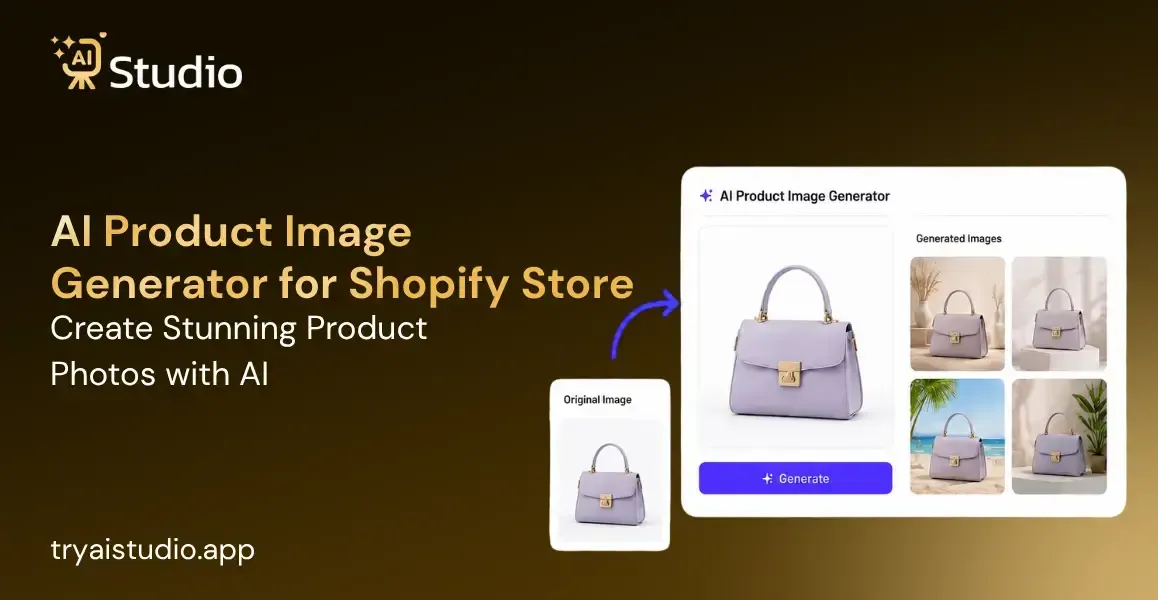
What is an AI product image generator? It is a type of software based on artificial intelligence technology that converts ordinary product images to high-quality studio images.
How does it work? The process includes uploading an ordinary image (you can even use a picture taken by a mobile phone), automatic removal of background and editing images from various angles.
The result is several professional pictures ready to use for your Shopify store, Amazon listing, or social media advertising campaigns.
Why does this matter for Shopify sellers?
You don't have inventory sitting in a studio for weeks waiting for photos. You don't hire expensive photographers for seasonal collections. You don't stress about maintaining consistent visuals across 500+ product listings. The AI handles that for you, at a fraction of the cost.
For D2C brands especially, this changes everything. You can launch new products faster. You can A/B test different product images on your ads without expensive reshoots. You can maintain catalog consistency even as you scale.
Why Shopify Sellers Are Switching to AI Product Photography
Four main reasons:
Speed. A professional photoshoot takes 2-4 weeks. AI image generation takes 2-5 minutes.
Cost. A traditional shoot costs ₹10,000 to ₹50,000. AI tools cost ₹500 to ₹5,000 per month for unlimited use.
Scalability. As your catalog grows from 50 products to 500, hiring more photographers isn't feasible. AI scales effortlessly.
Consistency. AI generates images with the same lighting, background, and style every single time. Your Shopify store looks professional and unified.
This is especially valuable if you're a jewelry seller managing hundreds of SKUs, or a fashion brand launching weekly collections.
Small business owners with limited budgets are adopting AI photography for small businesses faster than anyone. They have less to lose and everything to gain.
Traditional Product Photography vs. AI Image Generation Workflow
Let's compare the two approaches side by side.
Traditional Photography Workflow:
- Plan the shoot (1-2 weeks before)
- Rent a studio or hire a photographer (₹5,000-₹15,000)
- Arrange props, models, and lighting equipment
- Conduct the shoot (4-8 hours)
- Wait for editing and retouching (5-7 days)
- Receive final images (2-4 weeks total time)
- Cost per product: ₹1,000 to ₹5,000
AI Image Generation Workflow:
- Take or find a basic product image
- Upload to the AI tool (1 minute)
- Remove background and customize settings (2 minutes)
- Generate multiple variations (3-4 minutes)
- Download and use immediately (1 minute)
- Total time: 7-10 minutes
- Cost per product: ₹10 to ₹100 (depending on your tool)
There is a significant contrast here. The creation of imagery for your whole weekly stock will only take an afternoon with this method, but you will still be waiting for the first shipment with traditional photography vs AI shoots.
It is a huge shift for Shopify sellers looking for efficiency and cost-effectiveness.
How to Generate AI Product Images in 4 Simple Steps
Let's walk through the actual process. This works for jewelry, fashion, electronics, or any physical product.
Step 1: Sign Up and Access Your Dashboard
Go to tryaistudio.app to get started with AI Studio.
Create a free account by signing up with your email address. No credit card is required to start using the platform.
After completing the registration process, log in to your account. Your personal dashboard will open automatically, allowing you to begin creating AI-powered product photography.
Step 2: Choose Your Studio
Once you are on the dashboard, you will see three available studio options on the studio selection page:
- Photo Studio
- Marketing Studio
- Video Lab
Select Photo Studio if you want to generate professional AI product photography for your products.
Step 3: Select Your Product Category
The next step is to choose the category that best matches your product. This helps the AI understand the type of item you are uploading and generate more accurate results.
Available categories include:
- Fashion: For clothing items such as t-shirts, kurtas, dresses, sarees, jackets, and ethnic wear.
- Accessories: For products like watches, jewelry, handbags, belts, sunglasses, and similar items.
- E-Commerce: For general products such as electronics, home décor, beauty products, kitchen items, and other online store listings.
Choose the category that best represents your product before proceeding.
Step 4: Select Your Sub-Category
After selecting the main category, you will be directed to the sub-category selection page.
Choose one of the following options based on your product:
- Women
- Men
- Kids
Selecting the correct sub-category is especially important for Fashion and Accessories because it helps the AI generate the most suitable virtual model and ensures your product fits naturally in the final image.
Once you have selected the appropriate sub-category, click Next to continue.
Step 5: Upload Your Product Photo
Now it's time to upload your product images.
Primary Image (Required)
Upload one clear, front-facing image of your product. This image is mandatory and will be used by the AI to create the final product photography.
You can also upload a second image showing another angle of your product. This is highly recommended for accessories, jewelry, handbags, and products with detailed designs, as it helps the AI generate more accurate and realistic results.
After uploading your image(s), click Next: Add Details to move to the next step of the AI product photography creation process.
For a complete walkthrough with screenshots, refer to this detailed guide on how to create product photos with AI.
Real-World Examples: AI Product Photos That Actually Convert
Let's look at how real ecommerce sellers are using AI product photography.
Example 1: Fashion Brand Creating Lifestyle Shots
The brand had created a saree collection. Traditionally, they would source models, book a studio and do the shoots. This cost them ₹25,000. It took 2-3 weeks to finish.
In this case, they clicked pictures of all the sarees with a plain background. It took 2 hours.
After that, they fed these photos into an artificial intelligence algorithm. The software came up with a lifestyle picture of the saree. This process took 8-10 pictures per saree.
They were able to create studio-quality pictures for their online store in 24 hours. It only cost them ₹2,000 for the entire month. The pictures performed 23% better since they could show the saree being worn.
Learn more about how Indian brands are switching to AI photography for similar results.
Example 2: Jewelry Seller Generating Multiple Angles
A Bangalore jewelry seller manages 200+ SKUs. Before, photographing each piece from multiple angles required a professional photographer.
Now they take a single photo of each jewelry item. Upload to AI tool. The AI generates 5-6 different angles, different lighting, and zoomed shots.
They get 1,200+ images monthly. Cost: ₹1,500. Time: 4-5 hours.
Before, this same volume would cost ₹40,000 and take 3 weeks.
Amazon listings improved significantly because customers could see the jewelry from every angle before buying. Return rates dropped 12%.
Example 3: Shopify Store Maintaining Catalog Consistency
A Pune-based D2C wellness brand sells 80 products. Their Shopify store looked inconsistent. Some photos had white backgrounds, some had natural lighting, some looked amateur.
Customers saw this inconsistency and perceived lower quality. Conversion rate was 1.2%.
They standardized by taking one consistent photo of each product. Then generated all variations through AI with the same studio background and lighting.
Now their entire catalog looks professional and unified. Conversion improved to 2.8%. That's more than double.
AI vs. Traditional Product Photography: Cost Breakdown
Let's look at actual numbers for an Indian ecommerce business.
For a Fashion Brand with 100 Products
Traditional Photography:
- Studio rental (₹2,000/day) + 5 days: ₹10,000
- Photographer fee (₹3,000/day) + 5 days: ₹15,000
- Models and styling: ₹8,000
- Props and setup: ₹5,000
- Editing (₹500 per product) + 100 products: ₹50,000
- Total: ₹88,000
- Time: 3-4 weeks
AI Image Generation:
- Monthly subscription: ₹2,000 to ₹4,000
- Initial photography (basic images): ₹5,000
- Total: ₹7,000 to ₹9,000
- Time: 1-2 days
Savings: ₹79,000 to ₹81,000 (92% cost reduction)
For a Jewelry Seller with 150 Products
Traditional Photography:
- Professional jewelry photographer: ₹5,000 per day + 10 days: ₹50,000
- Studio with jewelry lighting setup: ₹3,000/day + 10 days: ₹30,000
- Editing and retouching: ₹1,000 per product + 150: ₹1,50,000
- Props and backgrounds: ₹10,000
- Total: ₹2,40,000
- Time: 4-5 weeks
AI Image Generation:
- Monthly subscription: ₹3,000 to ₹5,000
- Initial photography: ₹8,000
- Total: ₹11,000 to ₹13,000
- Time: 2-3 days
Savings: ₹2,27,000 to ₹2,29,000 (95% cost reduction)
For a Shopify Store with 50 Products (Ongoing Monthly)
Traditional Photography (for new products):
- Part-time photographer for 2 days: ₹8,000
- Props and background setup: ₹3,000
- Editing: ₹100 per product + 50: ₹5,000
- Monthly cost: ₹16,000
AI Image Generation (for new products):
- Monthly subscription: ₹2,500
- Basic photography for new products: ₹1,500
- Monthly cost: ₹4,000
Monthly savings: ₹12,000 (75% reduction)
These numbers are real. Small sellers who switch to AI cut their photography costs by 75-95%. See a full comparison of AI vs traditional photography for more detail.
Common Mistakes When Using AI Product Photography
Mistake 1: Starting with Low-Quality Input Images
The AI produces quality output only if you give it quality input.
If your base image is blurry, poorly lit, or shows the product unclearly, the AI will struggle. The generated images will inherit these problems.
Fix: Take clear, well-lit photos of your product. Use natural window light if possible. Make sure the product is the main focus.
Mistake 2: Using AI for Every Style of Image
AI excels at generating variations of the same product in different backgrounds and lighting. It's less effective at creating completely different styles.
For example: AI can generate your jewelry against 20 different backgrounds. It struggles to create authentic lifestyle images showing the jewelry on real hands in natural settings.
Fix: Use AI for background variations, angle changes, and lighting adjustments. For genuine lifestyle content, consider mixing AI-generated images with real lifestyle photography. You can also explore replacing photoshoots with AI virtual models for more flexibility.
Mistake 3: Not Customizing Generated Images
Most AI tools let you adjust the generated images. Colors, backgrounds, details. Many sellers skip this step.
Generated images work better when customized for your brand. Your jewelry might need a different background color than the default. Your fashion items might need specific lighting adjustments.
Fix: Spend 30 seconds customizing each batch of images. This makes them look more tailored to your brand.
Mistake 4: Uploading Everything Without Quality Check
AI is fast but not perfect. Sometimes the background removal leaves artifacts. Sometimes the lighting looks off.
If you upload unreviewed images to your Shopify store, some will look good and some will look rough. This damages credibility.
Fix: Review all generated images before uploading. Delete any that look off. Re-generate if needed. A quick quality check takes 2-3 minutes per batch.
Mistake 5: Ignoring Marketplace Requirements
Amazon and Flipkart have specific image requirements. Main product images must be on white backgrounds. Minimum dimensions are 500x500 pixels.
Some AI tools don't output images meeting these specs. You'll then need to edit them before uploading to marketplaces.
Fix: Know your platform's image requirements before generating. Choose an AI product photography tool for Amazon sellers that outputs images in the exact format required.
How Shopify Sellers Actually Use AI Tools for Product Images
Here's a realistic workflow that works for small sellers.
Weekly Process (3-4 hours total):
Monday Morning: Photograph new products (2-3 hours)
- Take basic photos in natural light
- Ensure products are clear and well-lit
Monday Afternoon: Upload to AI tool (30 minutes)
- Upload all weekly product photos
- Request variations and backgrounds
Tuesday Morning: Review and download images (1 hour)
- Check generated images for quality
- Delete any that don't meet standards
- Download the approved batch
Tuesday-Wednesday: Upload to Shopify, Amazon, or Flipkart (1-2 hours)
- Organize images by product
- Upload to your store
This workflow lets you manage new product photography in just a few hours weekly. Discover the best AI tools for ecommerce product photography to make this process even smoother.
Without AI, those same four hours would produce maybe 10-15 finished images. With AI, you get 80-120 finished images.
Key Takeaways: Quick Action Steps for Your Store
Calculate your current photography budget. How much do you spend monthly on product images? This is your potential savings with AI.
Take clear product photos at home. You don't need a professional camera. Use your smartphone in good natural light.
Test with 20-30 products first. Don't convert your entire catalog at once. Test the process and see how customers respond. Learn how to create product photos without a photoshoot to get started quickly.
Focus on consistency. Use the same AI tool and settings for all images. This creates a cohesive look across your Shopify store.
Compare before and after. Track conversion rates on pages with AI-generated images versus traditional photos. Most sellers see 15-25% improvement. Learn how to build high-converting ecommerce images using AI.
Keep learning and optimizing. Each generated batch teaches you something. The more you use the tool, the better your results become.
Conclusion
AI-powered product image generation has ceased to be an experiment. Now it is a cost-effective solution that helps small Shopify businesses, fashion companies, jewelry brands, and other organizations managing product catalogs.
It all comes down to numbers. The regular photography service will cost you ₹10,000 to ₹50,000 for a photoshoot and weeks of waiting time. An AI solution will only require ₹2,000 to ₹5,000 monthly and will deliver the result within minutes.
This can make a great difference for Indian online business owners who operate on a budget and need to meet deadlines. They will be able to keep up with the professional standards and create new product items quickly and affordably.
Begin small. Test on 20 to 30 items first. See how they affect your conversion rates. Expand your usage accordingly.
Today those entrepreneurs using artificial intelligence in their product photoshoots have a huge advantage over their rivals. They have professional-looking shops, better converting pages, and more up-to-date catalogs.
In this respect, the question is not about using AI but rather about whether one can afford not to.