


Virtual Product Photoshoot Software: Bring the Studio Online
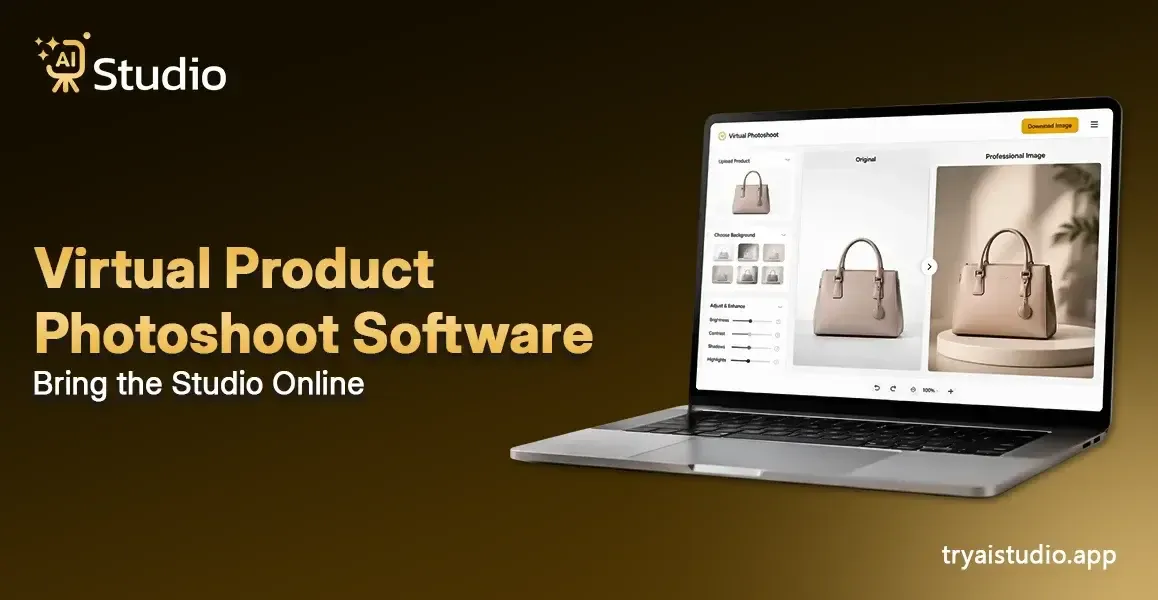
I've noticed a lot of sellers are kind of stuck on product photos. You might have the product ready, the listing is done, and even the title is fine, but then the photo, it slows everything down, like you hit a wall or something.
Because you end up booking a studio, finding a photographer, arranging a model, and suddenly you're thinking, how did it become ₹20,000 to ₹50,000 for just one shoot? And if the results are not that great, you basically go back again, start from zero, and pay once more.
This is why virtual product photoshoot software really changes the game. Instead of running the full studio routine, you just upload a simple photo of your product, and you receive polished studio-quality images in seconds. No studio setup, no photographer, no model.
Just your product, in a clean, premium look, ready for Amazon, Flipkart, Shopify, or basically any marketplace where you sell.
What Is Virtual Product Photoshoot Software?
So, let me get this across in a simple way. This virtual product photoshoot software is basically an AI-powered tool, where you upload a plain product image and it then turns it into something that looks like a real, professional photo with good backgrounds, smarter lighting, more believable shadows, and some styling, kind of like a studio did it. And it all runs automatically, so you do not have to worry about any design skills or anything like that, honestly.
Virtual product photoshoot software is a kind of thing where artificial intelligence helps you make, adjust, and sharpen product images, basically without needing an actual studio or camera setup, or even a professional photographer.
This kind of tool is built for:
- Amazon and Flipkart sellers who need consistent listing images
- Shopify store owners managing product catalogs
- D2C fashion brands in clothing, jewelry, and accessories
- Small business owners working with limited budgets
- Marketing agencies handling product shoots for multiple clients
And yes, both free and paid options exist. So even if you're just starting, you can try AI product photography without spending anything upfront.
How Is It Different from Traditional Photo Editing?
Traditional photo editing tools, like Photoshop or Lightroom, are honestly pretty useful, but they have this one big snag. They kinda require a properly clicked photo to start with. If the original image comes out wrong, like lighting or focus, then no amount of tweaks really saves it, you know what I mean.
Virtual product photoshoot software works in a different way. It can generate whole scenes from scratch, using your basic product image as the seed. You do not need some super perfectly lit shot either. In many cases, a clean smartphone capture is enough, and that's it.
If you want to understand how this compares more closely, this breakdown of AI product photography vs traditional shoots covers it in good detail.
How Does AI Product Photography Work?
Think about it this way. You hand over a rough photo of your product, and an intelligent system figures out the rest. Here is the exact process, step by step:
Step 1: Upload your product image. A smartphone photo works fine. The AI will handle the rest.
Step 2: The AI removes the background automatically using a smart AI background remover.
Step 3: You choose a background style. This could be a clean studio white, a lifestyle setting, a seasonal theme, or you can type a text prompt like "luxury marble table with soft shadows."
Step 4: The AI generates lighting, shadows, and composites your product into the scene naturally.
Step 5: Your marketplace-ready image is ready to download in seconds.
The technology behind this relies on diffusion models and background removal algorithms. But, really, you do not have to grasp the whole tech, like not even remotely. What counts is that it works, and you get results in seconds to minutes, not that 3 to 14-day waiting game you'd have with a traditional shoot.
If you want a deeper look at the process, this guide on how AI photo generators work for product photography explains it really well. Tools like AI Studio (tryaistudio.app) use this very same process. You just upload your product, the AI takes care of the heavy lifting, and then your product comes out looking as if it were staged in a proper studio.
AI vs. Traditional Product Photography: Real Cost Comparison
Here's the reality. Quality product photos are not optional for ecommerce, I mean, it really isn't. Research shows that 93% of consumers say that the visual look is a key factor in their buying decision. But traditional photography is pricey, particularly for Indian sellers who are juggling tight margins and complicated timelines.
In my own experience, I've seen small business owners spend around ₹30,000 on a single shoot, then later realize they have to redo it, because the product color feels off. And also, the background doesn't quite match their brand, not even close.
Let's look at the real numbers:
| Factor | Traditional Photography | AI / Virtual Software |
|---|---|---|
| Cost per image | ₹500 to ₹5,000+ | ₹5 to ₹50 |
| Turnaround time | 3 to 14 days | Minutes |
| Studio required | Yes | No |
| Scalability | Cost increases with volume | Flat monthly fee |
| Seasonal refresh | Costly reshoot every time | Instant |
For a catalog with 500 products, the usual photography route can end up costing ₹10 lakh or even more, every year. But if you use an AI product photo generator, that same kind of output becomes a lot cheaper, usually under ₹5,000 per year, depending on the subscription plan.
Instead of paying ₹20,000 for a single shoot, a lot of sellers now lean on AI tools like AI Studio (tryaistudio.app). It starts at about ₹600 per month, and it can produce studio quality images in close to 10 seconds per product. That's kinda the shift, fast turnaround, lower overhead.
Still, one thing I want to keep it real about: AI tools do come with limitations. Jewelry that has ultra-fine detailing, surfaces that are super reflective like chrome, and packaging that is fully transparent, these categories can sometimes show inconsistent results.
Also, AI doesn't really "replace" photography. It basically makes ecommerce product images at a professional level more affordable and easier to scale for any seller, whether you're small or you've got a bigger team and catalog.
Best Virtual Product Photoshoot Software in 2026
There are a few tools around today, and honestly, the right one kind of depends on your use case, not only on what the feature list says. Like you can't just pick a thing because it looks good on paper, you know. Anyway here are the top options worth knowing about, if you're trying to decide, and they can help in most situations.
Best Free AI Photo Editor Online: TryAIstudio
TryAIstudio is becoming a popular choice among creators, ecommerce sellers, and marketers looking for a free AI photo editor online. The platform helps users create professional-quality product photos, remove backgrounds, generate AI visuals, and enhance images without needing advanced editing skills.
- Best for: Ecommerce brands, Shopify sellers, and social media creators looking for fast AI-powered editing
- Key feature: AI-based product photo enhancement, background generation, and instant visual optimization
- Works great for: Product photography, fashion brands, cosmetics, gadgets, food items, and digital marketing creatives
Best Overall: Photoroom
Photoroom is one of the most widely used AI product photography tools in the market right now. It has over 150 million downloads and works on mobile, desktop, and web. The free tier gives you 250 exports per month, which is enough for testing.
- Best for: Shopify and Amazon sellers managing small to medium catalogs
- Key feature: Fast background removal and product staging across any category
- Works great for: Fashion, accessories, home goods, beauty products
Best for Catalog Scale: Claid AI
If you are handling a catalog that has 200 or more products, Claid AI is probably worth a look. It does batch automation, so you can run hundreds of images at once with steady lighting and the same overall style, which is pretty useful.
- Best for: D2C brands and fashion retailers
- Key feature: Generates full campaign sets including lifestyle images from a single product photo
- Works great for: Large ecommerce brands with frequent seasonal refreshes
Best Free Option: Pebblely
Pebblely is a good starting point if you want to try AI for product photography without any budget commitment. It has like over 90 pre-built background themes, from lifestyle to studio, seasonal, and holiday vibes too.
- Best for: Etsy sellers and early-stage Shopify stores
- Key feature: Simple upload-and-generate flow, no learning curve at all
- Works great for: Sellers testing AI photography for the first time
Best for Amazon and Shopify Sellers: Flair.ai
Flair.ai is built specifically for brand-consistent product images, and honestly, it works pretty well when you care about the look staying the same. You get drag-and-drop staging, an AI human model, and tools for brand guidelines, so it's a solid pick for sellers who need platform-compliant images kind of at scale, with less fuss.
- Best for: Amazon sellers and DTC brands with strict visual guidelines
- Key feature: Real-time team collaboration and template-based image creation
- Works great for: Fashion brands, beauty, and premium lifestyle products
For Indian sellers that need something affordable, quick, and kinda beginner-friendly, tools like AI Studio can be a solid combo of solid quality, speed, and price. I've noticed some D2C brands using AI Studio to make very consistent product images across their whole catalog, without hiring a single model or renting studio space.
How to Use Virtual Photoshoot Software: Step-by-Step for Beginners
This is the section most guides skip; they show you the tools but never tell you how to actually get started. I mean, you look around, and it's like, ok cool, but then what… Let me show you, step by step, exactly how to go from zero to a professional product photo, so you're not just staring at buttons.
This process works on any platform you choose:
Step 1: Take a clean photo of your product. Use natural light near a window if possible. A plain white or grey surface behind your product gives the AI cleaner edges to work with.
Step 2: Upload the image to your chosen virtual product photoshoot platform.
Step 3: Use the background removal tool to isolate your product from its original background.
Step 4: Select a background style from the presets, enter a text prompt describing what you want, or choose a seasonal or lifestyle theme.
Step 5: Review the generated image carefully. Check the product edges, shadows, and whether fine details like text, patterns, or textures are preserved accurately.
Step 6: Download in the correct format for your platform:
- Amazon: JPEG or TIFF, minimum 1,600px on the longest side, 85% or more product coverage on a white background
- Shopify: Square 1:1 or portrait 4:5 ratio works best for mobile storefront display
For a full walkthrough with examples, check out this guide on how to create product photos with AI.
Pro Tip: The cleaner your original photo, the better the AI output. Shoot your product against a plain background and in good light. That one habit saves you a lot of editing time later.
Platform-Specific Tips: Amazon, Shopify, and Beyond
If you sell on multiple platforms, you already kinda know that each one has its own image rules, or at least it feels that way. Getting it right makes a real difference in your listing quality and in conversion rates, too, honestly.
Here is what you need to keep in mind for the two biggest platforms.
Amazon Sellers
Amazon has some of the strictest product image requirements in ecommerce:
- The main listing image must have a pure white background
- Minimum image size is 1,600px on the longest side
- The product must cover at least 85% of the frame
- No watermarks, text overlays, or props in the main image
The best AI tools for making Amazon listing images that stay compliant are kind of Photoroom; it has Amazon-specific templates already baked in there, and then Nightjar, which has a product listing image workflow that's built exactly for this kind of use. Also, Amazon itself launched an AI image generation option for third-party sellers in Q3 2025, so now you've got this more native alternative, right inside Seller Central, for people who want it.
Shopify Sellers
Shopify is more flexible but has its own best practices:
- Square 1:1 ratio or portrait 4:5 ratio works best for mobile storefront
- Consistent image sizing across your catalog improves the overall store look
- Shopify's 2025 update added native AI image generation inside the admin panel
- Third-party tools like Flair.ai and CreatorKit offer deeper integration with your product catalog
For Indian Shopify sellers who are running D2C brands, the different Shopify AI image generator options that are available today, including AI Studio, make it genuinely easier to keep a consistent and professional product catalog, even without a huge photography budget or all that extra shoot time.
Conclusion
Running a product business in India is already challenging enough. And paying ₹20,000 to ₹50,000 for a single photoshoot every time you launch a new product should not be the norm anymore, even if it sounds like "industry standard" in some circles.
Now there's virtual product photoshoot software, and it's made it actually workable for just about every seller, be it Amazon, Flipkart, or Shopify, to pull studio-quality images without needing a studio setup. These days, the tools feel quick, affordable, and pretty beginner-friendly, so you don't have to be some photography guru to start.
If you have not tried AI product photography yet, begin with a free plan, run a few product tests, and check the output yourself. The change is already moving across Indian ecommerce. Sellers who jump early are, in a very real way, stacking a visual edge that stays.